LumberJocks
DAILY DEALS Clampmate Frame Clamp - Internet Only Special!  |  Makita Makita Recon LCT203W 10.8 Volt Lithium Ion Impact Driver 2 Pc Kit

Cutlist and Layout from Sketchup

Blog entry by daltxguy posted 505 days ago 30724 reads 76 times favorited 255 comments Add to Favorites Watch

If you’re a fan of Sketchup for creating woodworking models, then the next obvious step is to use Sketchup to help you create cutlists and layouts. Sketchup plugin Cutlist 4.0 does just that. CutList 4.0 sketchup plugin helps you determine how much of each material you need to produce your design, taking into account nominal sized lumber with allowances for finishing to final size. Then it goes one further and lays out all of the pieces on boards or sheet good sizes of your choosing. Then you should be all set to head for the lumber yard to get all of the materials that you will need with no return trips.

CutList 4.0 was beta tested by our very own Lumberjocks and is now ready for download.

It’s being released exclusively to Lumberjocks first. You can download v4.0.7 here . Lest you think this is an ad, this is a completely free plugin. This plugin has been around for a while but it’s been completely revamped. It’s got the look and feel of old Woodsmith magazine cutlists and layouts. The previous version v3.3 was reviewed in the Fine Woodworking blog 'Design.Click.Build.' by Dave Richards and a later follow up.

For more information on features, limitations and known issues ( and downloading too) visit my website.

Note that there is now a forum on Lumberjocks for further discussion.

Installing. This is a two step process. Click on the link above. This will take you to a shared file located on box.net, then click on the download button.

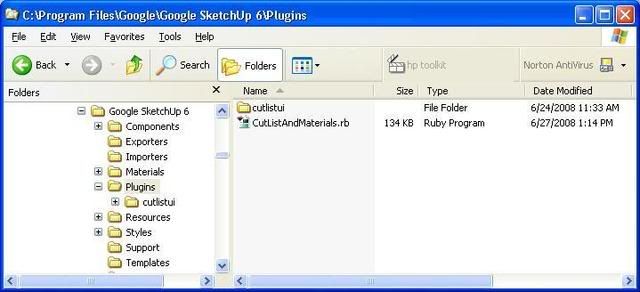
The file is a zip file. Extract the entire contents into your sketchup plugin directory not just the ruby script. There is a folder called cutlistui which contains everything else it needs to work properly. The exact locations of the directories required for Sketchup plugins for Windows or Mac are found documented further down in the blog.

Running on a Mac. This is functional. Only the html output window for the layout does not work because of issues with the Safari browser, however, there is a workaround using the SVG export.

Someone in the forum asked a great question which I will repeat here:

Q. Not to be sarcastic (or stupid), but I’m not sure of the point of the cutting diagram?

A. Why indeed would you want a cutting diagram? There are a few reasons:
  1. Regardless of whether or not you have a cutting diagram, eventually you are going to have to cut some wood to get a project built. How many boards do you need to buy? If you go by the board feet measured ( or calculated by something like the cutlist plugin) you’re going to find that it falls short. Why? because when you to to cut the pieces out of the board, you’ll find that you will inevitable have waste. By having the cutting diagram, you can see how much waste there is going to be and you know how much to get when you to the lumber yard.
  2. You’ve got a lot of parts to cut and you want your parts to be as accurate as possible before you even do anything else to the pieces. Ideally you want one setup for each size of part, so that you can cut each of the parts which are the same size at the same time. The cutting diagram lets you visualize how parts may be laid out to minimize on the cuts and the number of setups.
  3. Ok, you’ve decided to build your project out of sustainably harvested plantation teak. It’s selling for $50/square foot(!) for 3/4”. You might be interested in using those $200 boards as efficiently as possible. A cutting diagram may also be used to minimize waste. Even if you have waste if you could have a larger part left over which you could reuse for another project vs having a lot of offcuts, you’ve saved yourself some money and you are using the planet’s resources efficiently and responsibly.

So, to sum up, it gives you more accurate project requirements, it minimizes setup time and shop time spent cutting the boards while increasing accuracy and finally it helps to use the resources as efficiently as possible.

Finally here are some screen shots in case you still can’t quite figure out what it does or why you would want it or can’t imagine what it looks like.

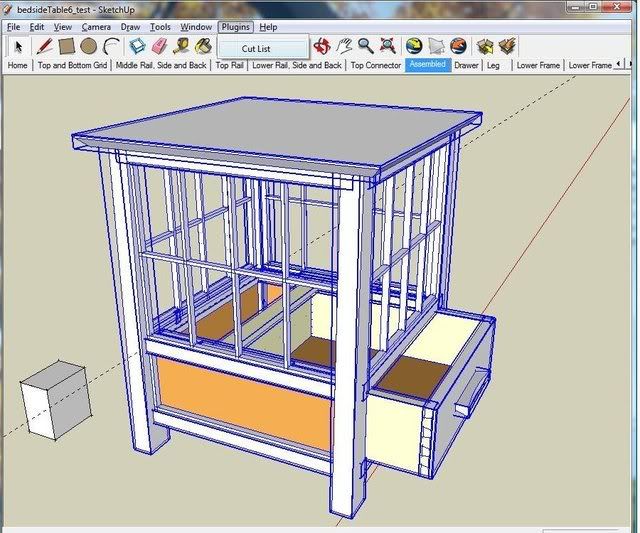
Starting up cutlist. Highlight your project and select CutList from the plugin menu. Make sure all of the parts in your project are named and are either a component or a group. ( Nested components or groups are handled ok as well)
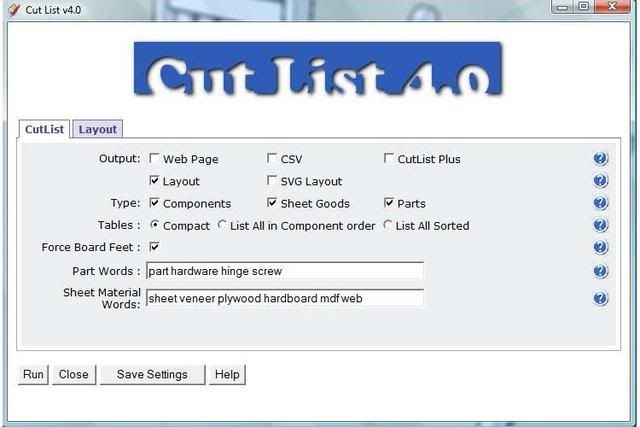
The screen that comes up allows you to select your cutlist options from the type of output you want, what you want to have included in your parts list, which parts are solid wood parts, which are sheet goods parts and which are hardware
and the next page allows you to select the layout options. There is a general options section, a tab for board options and a tab for sheet options.

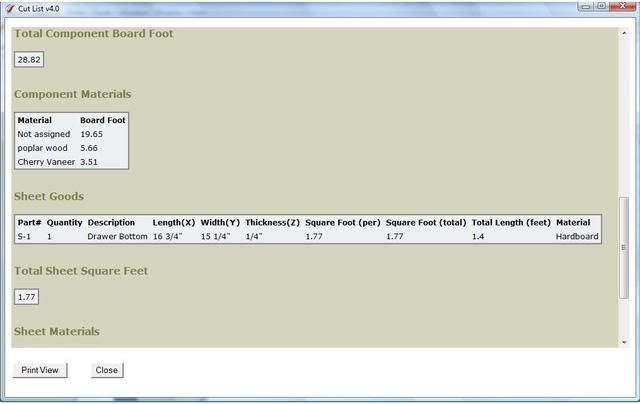
Here is a sample of cutlist output. This is the cutting list in html format. This page can be printed.

If you scroll down, then there is a summary of the board feet and the materials and sheet parts and hardware are broken down to their own lists with their own summaries
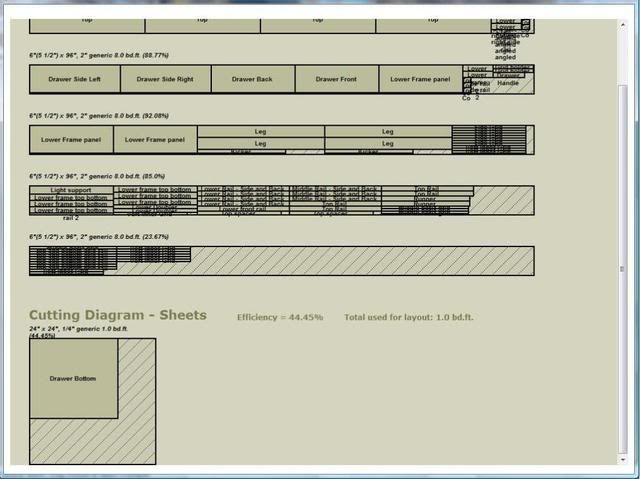
If you selected the layout output, then another window will open and place all of the selected parts on boards of your choosing in a layout which minimizes waste.
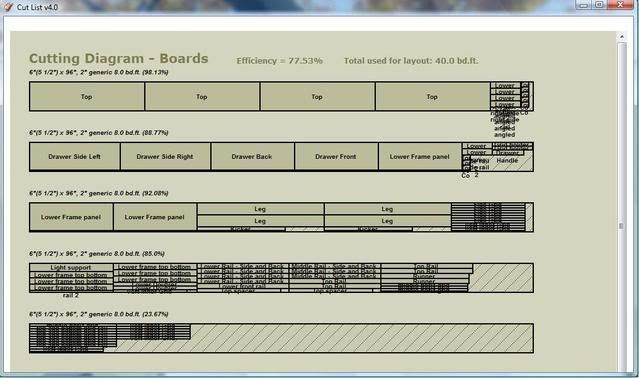
Sheet parts layout is placed on the sheet sizes you specified.
There’s lots more. There is built in help on each option. Just click on the blue ? next to the option.

Feel free to pass along any comments, questions, enhancement requests or bug reports. I’m committed to maintaining the plugin and make it as useful as possible.

-- Steve, New Zealand, www.steveracz.com


255 comments so far

View Damian Penney's profile

Damian Penney

1030 posts in 882 days


posted 505 days ago

Fantastic! Can’t wait to try this out :) Thanks.

-- I am always doing that which I can not do, in order that I may learn how to do it. - Pablo Picasso

View Damian Penney's profile

Damian Penney

1030 posts in 882 days


posted 505 days ago

Just saw your post regards the algo (I wish LJ would automatically email with new comments on posts I’ve replied to). I started down this path a while back and had hours of fun with the packing algos (not having a degree in math) there is a lot of info on the subject and they are all 2DBPP algos, 2D Bin Packing Problems. It’s a common problem. I gave up when I couldn’t write an algo that beat Cutlist Pro. Have you compared yours to Cutlist Pro?

Maybe you can understand what these guys are talking about A Unifed Tabu Search Code for
Multi-Dimensional Bin Packing Problems
from the sounds of it you are using a best fit first, sort pieces by max height/width then add them in a row

These guys also put together an overview of the various approaches you can use which I found pretty useful.

Anyway, hope these links prove interesting and thanks again for al the hard work you’ve put into this.

-- I am always doing that which I can not do, in order that I may learn how to do it. - Pablo Picasso

View PurpLev's profile

PurpLev

2726 posts in 539 days


posted 505 days ago

no go on a mac = that is a :( indeed… is your UI based on the browser libraries?

-- When in doubt - There is no doubt - Go the safer route.

View Chris 's profile

Chris

1462 posts in 882 days


posted 505 days ago

Looks Great Steve!.... I have only recently started in on Sketchup and will be looking at this as a next step for any designs I develop.

Thanks!

-- Chris

View daltxguy's profile

daltxguy

558 posts in 805 days


posted 505 days ago

Hi Damian,

Thanks for the paper.

It looks like the 2D version of the ‘Tabu’ algorithm is pretty much exactly what I did, only I thought it was intuitively obvious from the way I would lay out the pieces as a woodworker. I developed my idea of how to implement it 15 years ago, beating these guys by a decade. The idea, I thought, was trivial, the implementation is slightly more interesting. I just didn’t get around to it and I didn’t write a paper ( maybe I should have). The only thing they’ve added in ‘TABU” is the ability to do 3D ( which is a simple extension of what I do), the ability to reposition pieces for a potentially better fit ( which I planned to do but then thought that it wouldn’t add a great deal of value), and the ability to use different sized bins ( the infrastructure for this exists in my version of Cutlist, but I left this for later).

What he calls ‘bins’ we call boards or sheets.

The 3D packing problem could be useful for layout a well, for resawn boards. It could also be extended to sawmilling. In fact this is being done – some interesting technology exists today in sawmilling where logs are scanned or x-rayed in real time and optimal cuts are computed taking into account structural defects, quality of wood, log size and market demand. I think this is all good use of technology, better than building weapons.

I haven’t compared with CutListPlus. I’ve got a very old trial copy which I’ve never used. I think the trial version has limits on how much it would lay out. If anyone has CutListPlus and can compare, I would be interested to hear any results.

-- Steve, New Zealand, www.steveracz.com

View daltxguy's profile

daltxguy

558 posts in 805 days


posted 505 days ago

Hey Purp,

Sorry about the Mac thing. Everything I’m doing is standard stuff. I’ve even tried the html pages in Firefox, MS IE and Safari and they all work fine and all work the same way. The issue seems to be with Sketchup’s insistence that Windows Sketchup uses MS IE and Mac Sketchup uses Safari regardless of what your default browser is AND with Safari, Sketchup’s interface ( The WebDialog class) to a web page has some issues. It doesn’t help that apparently Sketchup blames Safari, Safari blames Sketchup.

The only solution would be to be able to pick a browser in Sketchup but that’s not currently possible. – maybe I’ll lobby the Sketchup folks for this feature to be in SU7.

-- Steve, New Zealand, www.steveracz.com

View DaveR's profile

DaveR

1516 posts in 611 days


posted 505 days ago

Nice work. I’ve just had a bit of a play with it. It looks like a big addition to SketchUp for woodworking. Thank you.

By the way, Steve, you might want to change the link to my blog post about V3.3 to http://blogs.taunton.com/n/blogs/blog.aspx?nav=main&webtag=fw-designforum&entry=108 and perhaps add http://blogs.taunton.com/n/blogs/blog.aspx?nav=main&webtag=fw-designforum&entry=111

I just wrote a short little post on Version 4 a few minutes ago, too.

Thanks again.

Dave

-- Until you spread your wings, you'll have no idea how far you can walk.

View Chris 's profile

Chris

1462 posts in 882 days


posted 504 days ago

Steve,

I have the current Cutlist Plus; Your solution appears to go head 2 head with it. I will install yours and give it a run!

Ok?

-- Chris

View daveintexas's profile

daveintexas

338 posts in 766 days


posted 504 days ago

Looks like a good addition to the program. And I see Dave Richards has joined in, he is great with sketchup.

Not wanting to hijack the thread but I have been wondering when Sketch up will go metric ? Maybe a plug to be available?
I ask, because I and some others have been doing some shop work using metric measuring and I can see some real advantages.
Anyway-thanks for posting this blog

-- MISSION FURNITURE-My mission is to build furniture

View daltxguy's profile

daltxguy

558 posts in 805 days


posted 504 days ago

DaveR – I’ll get these changes made asap. Thanks for stopping in and taking a look and the quickie review on Design.Build.Click. You may be disappointed with the printing capabilities of the layout portion, though. Can’t print directly from the output window – quirk with the javascript I was using to produce the graphics and MS IE. This still needs improvement. I threw in the the ability to produce a SVG file to try to address this. SVG output can be read by Firefox ( MS IE is useless at it) and then printed but it’s still not perfect. If you have another SVG reader, then I suspect it will be better. The advantage of SVG is that it’s scalar ( the S in SVG) ie: you can zoom in and out – should make it easier to see the small parts laid out.

Chris : Give it a shot buddy. I’d be real curious. Btw, there is a known issue with the csv output and CutListPlus 2009. I don’t have the exact details, which is why I couldn’t fix it….but if someone can tell me, I’ll make the changes.

Daveintexas : Metric works in Sketchup already and this plugin supports it too and it’s been tested with metric. I work in metric measure but I like to show total volume in board feet, so that is supported too. ( The combination is common where I am). To switch to metric measure, you have to change the unit in the model ( everything else is automatic). Window->Model Info-> Length Units. Set Format to Decimal and then the units to Millimeters, Centimeters or Meters. If you then run CutList again, all measures will show up in metric. How cool is that?

-- Steve, New Zealand, www.steveracz.com

View Bob O'Brien's profile

Bob O'Brien

11 posts in 505 days


posted 504 days ago

I am running Google SketchUp Pro 6, and when I open the CutList plug-in I get the MS “This program cannot display the webpage.” Any help on this?

-- Bob

View titmas's profile

titmas

30 posts in 797 days


posted 504 days ago

i extracted the entire contents of the zip file to my plugins folder but it is not available when i open SU6. is there another step im missing?

View Damian Penney's profile

Damian Penney

1030 posts in 882 days


posted 504 days ago

Thanks for the followup Steve, sounds perfect :)

-- I am always doing that which I can not do, in order that I may learn how to do it. - Pablo Picasso

View Damian Penney's profile

Damian Penney

1030 posts in 882 days


posted 504 days ago

Could you just rename firefox.exe to safari.exe (or whatever the mac version of this is)

-- I am always doing that which I can not do, in order that I may learn how to do it. - Pablo Picasso

View daltxguy's profile

daltxguy

558 posts in 805 days


posted 504 days ago

Bob,
This is usually an indication that it can’t find the html file used as the interface for the plugin. Make sure the folder ‘cutlistui’ from the zip file is also in your plugins folder.

titmas : Not sure what happened there, you might have unzipped it to a folder in the plugins folder. The ruby script has to be in the plugins folder along with the folder cutlistui which contains the rest of what the plugin needs.

Here is what your directory should look like after installation:

Hope this helps and you get to the fun stuff!

-- Steve, New Zealand, www.steveracz.com

View Rhinodesign's profile

Rhinodesign

6 posts in 532 days


posted 503 days ago

Looks like a great program. Can’t wait to try it out!!!!!

View Bob O'Brien's profile

Bob O'Brien

11 posts in 505 days


posted 502 days ago

Steve,

The cutlistui folder did the trick! Can’t wait to start using it. Thanks for your help!

-- Bob

View daltxguy's profile

daltxguy

558 posts in 805 days


posted 501 days ago

Newsflash!

I’ve had a bit of a breakthrough in making a version compatible with the Mac, thanks to Corbin Dunn of Blue Tree Software, a woodworker and a programmer on the Mac OS with Apple, who contacted me offlist.

For those daring enough to edit the ruby script you can find and change the following two lines ( the backslashes become forward slashes )

  #relative location of the cutlist input html page
  @@cutlistui_location = '/cutlistui/cutlistui.html'

  #relative location of the cutlist result html template
  @@cutlistresult_location = '/cutlistui/cutlistresult.html'

Otherwise, I’ll have more news shortly on having a single version which works for both. ( I just tested this and this work for Windows too, so it should be possible to maintain a single version).

Woohoo!

-- Steve, New Zealand, www.steveracz.com

View DaveR's profile

DaveR

1516 posts in 611 days


posted 500 days ago

Steve, glad you got the Mac thing straightened out. I got a note from Corbin about this, too. It is definitely good news.

I’ve got a puzzle for you on a different topic. Sometimes I will scale a component after it is made. For example I might be working on a coffee table and a side table. The only difference between their legs might be the length. If I copy the leg drawn for one table, make it unique and then scale it for the other table, the CutList plugin reports the dimensions of the new leg as being the same size as the original. This doesn’t seem to be a problem if I resize the leg using other methods.

There are other examples where I might make some parts at a larger scale to avoid the tiny face problem. Usually those parts are drawn in reference to a copy of another component that has been scaled up. Once those parts are complete, they are made into components and scaled down to be inserted into the model. The problem is that a tiny little spline might get reported as needing more board feet of lumber than the rest of the project combined.

Any fix for this?

Thanks a bunch.

Dave

-- Until you spread your wings, you'll have no idea how far you can walk.

View daltxguy's profile

daltxguy

558 posts in 805 days


posted 500 days ago

Hi Dave,

That’s a mighty big spline you’re trying to use – I have an idea – why not just take the spline and carve a table out of it!

I think I know what might be happening. I’ll confirm it with some more testing and if I am right, relatively easy to fix and incorporate into an updated version.

If you care to follow the logic of this:
In order to fix the bounding box issue with rotated parts, the dimensions for a part was changed to come from the component or group definition rather than the instance. It appears ( and makes sense ) that scaling ( just like rotation) is an attribute of the component or group instance rather than the definition. So, to get the true dimension of a part, I’ll have to apply any scaling to the bounding box dimensions found in the definition. Scaling is not being taken into account, which is why you would always get the same size as the original definition.

Good catch, Dave!

I’ll let you know when I have a new version ready to go.

-- Steve, New Zealand, www.steveracz.com

View DaveR's profile

DaveR

1516 posts in 611 days


posted 500 days ago

Hi Steve,

I think I understand what you’re getting at with the definition/instance thing. Thanks for working to fix that. Although I had seen it the day I downloaded it—lucky choice of model—I hadn’t had a chance to follow up on it. A fellow reported it on a comment to my blog post about the new version so I figured it wasn’t just me.

FWIW, the piece I discovered the problem with is Gary Rogowski’s “Arts and Crafts bed and the splines are the little ebony bits at the tops of the legs. I suppose whittling the entire bed out of one hunk of ebony might be an option but even if there was a piece that big, I couldn’t afford to buy it.

Photobucket

-- Until you spread your wings, you'll have no idea how far you can walk.

View DaveR's profile

DaveR

1516 posts in 611 days


posted 500 days ago

Steve, I found anotherstrange thing. I made a test model of eight components (instances of one) and added “sheet” to the named material. The CutList reports the dimensions correctly but no diagram is generated. Then I added a single board component and I got both a diagram for the board and another for the sheet goods. It appears if there are no boards, the plugin doesn’t look for sheet goods for the diagram.

Thanks again.

Dave

-- Until you spread your wings, you'll have no idea how far you can walk.

View daltxguy's profile

daltxguy

558 posts in 805 days


posted 500 days ago

Hi Dave,

Thanks again. I’ll look into the other issue as well. It wasn’t designed to work that way but that doesn’t mean it didn’t end up that way!

I’ve been playing with the scaling thing and I now have a working version for components. I just want to make sure it also works for groups the same way and then i need to double check I got the scaling in the right direction. Sketchup uses x,y,z axis for scaling but a bounding box has width, height and depth!

Looks like I’ll have to get a version 4.1 out with Mac support, scaling and other fixes soon.

That’s a good looking bed. Perhaps all ebony would probably be overkill though, a bit dark.

He also has this table but this one has too much cow for my liking :) Not sure how that would show up in the parts list.

-- Steve, New Zealand, www.steveracz.com

View DaveR's profile

DaveR

1516 posts in 611 days


posted 500 days ago

Steve,

Thank you for looking into this stuff. Lots of details to work out and keep track of aren’t there?

Sorry about the cow. I made the style for SketchUp but someone else added the cow. It makes me laugh every time I see it. The table is based on a Thos. Moser piece. I’m hoping to build it one of these days.

Thanks again.

Dave

-- Until you spread your wings, you'll have no idea how far you can walk.

View depictureboy's profile

depictureboy

305 posts in 533 days


posted 500 days ago

You guys are awsome. I was trying to use ecabinets for alot of my stuff, but with all the excellent work you guys are doing on this one plugin, sketchup has become my tool of choice for almost everything.

-- If you can't build it, code it. If you can't code it, build it. But always ALWAYS take a picture.

View gdoebs's profile

gdoebs

8 posts in 500 days


posted 499 days ago

Hey Steve,
This is just awesome! I’ve used CutList Plus on Windows XP, but now I have Mac so I’ve been wanting a cutlist/layout program for Mac for a long time! I made the Mac changes stated above, and now it works, although it looks a little funny. On the components page I get a bunch of ”\n” everywhere. I haven’t gone through any of the setups other than defaults, so that may be some of my problem. And it looks like I need to learn how to assign materials to my components.

Thanks for the awesome program!

Geoff

-- Geoff

View daltxguy's profile

daltxguy

558 posts in 805 days


posted 499 days ago

Geoff,

Yeah, the changes above at least get it going for Macs. it’s better but not perfect yet.

  • Getting the cutlist seems to work now except for the nuisance ”\n” which is the plugin’s fault but that too can be remedied with a small change. I’ll provide details later.For now, it just gets in the way but it’s harmless.
  • The layout option will still create some grief because Safari is unhappy with some of the ways in which the output is produced in the browser – however, you can always use the SVG layout option instead and produce an SVG file. This text file looks like xml but it’s for graphics and is readable using Firefox browsers( File-> Open File) or other SVG readers ( I believe there is a plugin available for MS IE)

This seems to be the best workaround for Mac users for now. I’m glad to hear that it’s useful enough for you.

depictureboy: Thanks for your comments and support. I’m not familiar with eCabinets ( other than having heard about it ). I’m glad CutList is giving you some value. I just wanted to produce something which was useful for me, building on the excellent base that Sketchup has provided. Go Google!

Btw, the feedback we are getting here from those who are trying it and letting me know of any issues is the reason why this can just get better and more useful.

-- Steve, New Zealand, www.steveracz.com

View TedG's profile

TedG

10 posts in 499 days


posted 499 days ago

Ive been using Setchup for six months and the addition of cutlist 4 makes good software much better. The main issue I have with it concerns the printing or lack of it. I have managed to print the component list but the cutting diagram is more problematic as there is no “Print View” button on screen. In case others are having the same problem, I manged to print it by right clicking it and choosing print I assume this will be sorted in a later version but until then Thanks
PS I also modified the script so that the background is left white I just hate to waste all tha ink

—Ted Gibbs

-- Ted Gibbs Edinburgh Scotland

View gdoebs's profile

gdoebs

8 posts in 500 days


posted 499 days ago

Thanks Steve,
I tried this last night on a wine cellar I’m working on. After it ran, I got a message about it not being able to place some components. Some components are 16”+ wide and 8’ long. These are going to be glued up solid wood panels. Obviously they can’t be placed on a 6” wide board, but would these components be included in the total board feet calculation?

Maybe a future addition would be to include in the layout the boards that maybe included in a glued up component? Maybe the material could include “glued up panel” or something like that.

Keep up the great work!

-- Geoff

View depictureboy's profile

depictureboy

305 posts in 533 days


posted 498 days ago

Geoff, Check your layout settings. You may not be using a board that is long enough to accomodate your longest plank, and you also may be using the dressed setting instead of the rough setting. I dont think your issue is with the width, but with the length.

-- If you can't build it, code it. If you can't code it, build it. But always ALWAYS take a picture.

View daltxguy's profile

daltxguy

558 posts in 805 days


posted 498 days ago

TedG:
  • Printing the cutlist. I hear ya. I’ll make sure to make the change to print the cutlist on a white background. I understand about the ink thing.
  • Printing the layout. I’ve mentioned this a few times. This has been rather problematic. The ‘print view’ button is disabled for a reason. If you were to re-enable it and push the print button, all you would get is the script which was dynamically produced to create the graphics. The method I used to produce the graphics has a printable mode option but when turned on, MS IE completely messes up the display. I even contacted the original author to see if there was a workaround and he admitted that he didn’t know of one, it’s an MS IE thing. There are a few alternatives. The first is the one you pointed out. The second might be to take a print screen of the window and copy to a paint program and print from there. The only disadvantage here is that you only get what is displayed. The last one is the one I put in place as a workaround: Select the SVG layout option and read the resulting .svg file into either Firefox, MSIE with the SVG plugin or an SVG reader.

-- Steve, New Zealand, www.steveracz.com

View daltxguy's profile

daltxguy

558 posts in 805 days


posted 498 days ago

Geoff: The ability to split wide parts is already supported. It’s an option on the layout page main options (Split Wide Parts). It will split the part to whatever board size you have selected and it takes into account whether you are laying out to dressed boards or not. It will always split the board into same sized parts and go oversize if necessary. In your case, your 16” wide part will be split into 3x 6” wide parts. As depictureboy mentioned, if you didn’t select at least 8’ board sizes for layout, then it won’t be able to do it.

There is also another option to display any parts which were not laid out ( Display unplaced parts ) – so you can see what didn’t get placed. It gets printed at the very end of the layout screen. This might give you an idea of what might have happened. Mainly these are parts which are too big and result in too many splits or it’s longer than the board size you’ve selected.

The board feet calculation is independent of the layout. If it’s on the cutlist, it’s been added to the board feet calculation.

The layout includes another board feet calculation, resulting from the number of boards required for layout and includes the waste.

You make a good suggestion to rename any parts which have been split or at least to append something to the name to indicate it’s a glue up panel. It’s an easy change and I can add it to the next version.

Good comments guys. Thanks!

-- Steve, New Zealand, www.steveracz.com

View sIKE's profile (online now)

sIKE

1094 posts in 644 days


posted 496 days ago

daltxguy,

This is one nice addition to Sketchup. I am in the process of modeling up a qtr round display case and getting and accurate wood layout is a very nice addition to the process.

-- //FC - Round Rock, TX - "Experience is what you get just after you need it"

View Blake's profile

Blake

2749 posts in 765 days


posted 496 days ago

Whoa… just noticed this post. Gotta spend more time reading it later. COOL!

-- Check out my new website! http://www.blakeweberwoodworking.com

View GaryK's profile

GaryK

9518 posts in 879 days


posted 496 days ago

I guess I should really learn Sketchup, huh?

-- Gary, East TX -- The longest journey begins with a single step.

View daltxguy's profile

daltxguy

558 posts in 805 days


posted 496 days ago

I’ve just uploaded a new version of the plugin – v4.0.4
If you click on the download link in the original post, you will now get this version

It has the follow fixes/enhancements in it:
  1. Now handles scaled components and groups. Previously, scaled copies of components or groups showed up incorrectly as the original definition size. This has been corrected.
  2. Mac support – better now. Cutlist display should come up. Thre is still an issue with the layout display but using the layout SVG output is a workaround there.
  3. Better support for nested components. If a component has subcomponents, then only the lowest level subcomponents are included in the cutlist.
  4. Sheet goods only layout. If you had only sheet goods in your cutlist, the layout was not displaying. This has been corrected.
  5. Html window heading now displays the subversion number as well, so you can tell which version you are running

Steve

-- Steve, New Zealand, www.steveracz.com

View gdoebs's profile

gdoebs

8 posts in 500 days


posted 494 days ago

Hi Steve,
I’m trying to find where the CSV file is written on a Mac? I’ve looked through the help but can’t seem to find the location. BTW, the new version is great on the Mac – I’m still learning it though.

Thanks,
Geoff

-- Geoff

View daltxguy's profile

daltxguy

558 posts in 805 days


posted 494 days ago

Hi Geoff,

Glad to hear the Mac version is better now.

I think the original intention was for the file to be written to the same directory as your sketchup file but I notice that on Win-doze based systems it’s writing it to the desktop.

In any case, when it writes the file, a window should pop up letting you know that the file was written and where. If this is not happening on the Mac, let me know. I can get my Macman to have a look at it.

I’m playing without a safety net with the Mac stuff. I’m having to making changes based on the feedback I get so keep hammering me with anything that doesn’t work. I’m even willing to send you test fixes so you can pioneer the solutions with me.

Steve

-- Steve, New Zealand, www.steveracz.com

View DaveR's profile

DaveR

1516 posts in 611 days


posted 494 days ago

Steve, thanks for the update.

I’m curious about the SVG export. I tried viewing it in Firefox. I seem to be only able to get one screen’s worth of it though. What am I missing?

The same thing happens with the Adobe plugin for Internet Explorer.

Thanks again,

Dave

-- Until you spread your wings, you'll have no idea how far you can walk.

View Sparky977's profile

Sparky977

56 posts in 610 days


posted 493 days ago

Ok, usually, I can figure most computer related things out. I am stumped here. I am still learning sketchup. How do I use this plugin with it? I am using a Mac.

-- I get payed to play with power tools! What could be better than that?

View daltxguy's profile

daltxguy

558 posts in 805 days


posted 493 days ago

Hi Dave R,

You’re not missing anything wrt SVG viewing in Firefox ( or MSIE with Adobe SVG reader plugin ). Im sure I am missing something in the SVG file when the display length exceeds the screen size.

I’ve been looking at this but haven’t figured out anything helpful yet! I guess I was hoping that SVG readers would automatically paginate, but no :(

Steve

-- Steve, New Zealand, www.steveracz.com

View daltxguy's profile

daltxguy

558 posts in 805 days


posted 493 days ago

Hi Sparky

Nothing special for Macs. Same as for everyone else. Unpack the contents of the zip file into the Sketchup plugin directory and fire up Sketchup. See the screen shot in a previous post above showing how it looks after installation.

You should then see the ‘Cutlist’ option in the Plugins menu ( see the very first screen shot in the post).

Steve

-- Steve, New Zealand, www.steveracz.com

View Sparky977's profile

Sparky977

56 posts in 610 days


posted 493 days ago

where is the “plugin” directory for sketchup on a Mac?

-- I get payed to play with power tools! What could be better than that?

View Miket's profile

Miket

265 posts in 662 days


posted 493 days ago

Great looking addition to sketchup!

-- It's better to have people think you're stupid rather than open your mouth and remove all doubt.

View daltxguy's profile

daltxguy

558 posts in 805 days


posted 493 days ago

Shame on you Sparky. You’re making me do your googling for you. I don’t have a Mac but I did find this:

The default location of the Plugins folder in Windows is:

c:\program files\google\google sketchup 6\plugins\

and for a Mac:

Macintosh HD/Library/Application Support/Google SketchUp 6/SketchUp/

found here on the sketchup how-to forum, which is a good general sketchup resource.

The original reference is here in an article how to install a plugin

-- Steve, New Zealand, www.steveracz.com

View Sparky977's profile

Sparky977

56 posts in 610 days


posted 493 days ago

Cool, thanks! Sorry for making you do the looking. I had spent a lot of time already going through the help file for sketchup and hadn’t found anything that answered my question. It was late and I was getting irritated. :)

-- I get payed to play with power tools! What could be better than that?

View daltxguy's profile

daltxguy

558 posts in 805 days


posted 493 days ago

No worries Sparky. I guess I should have put a :) on the comment above.

I’ll probably include a Readme file in the next version to give people a place to start with any questions.

I hope you get to the fun stuff soon!

-- Steve, New Zealand, www.steveracz.com

View DaveR's profile

DaveR

1516 posts in 611 days


posted 493 days ago

Thanks Steve,

If you figure out a fix, I’d be happy to try it out.

Dave

p.s. would you like to come up and see my etchings? :D
Photobucket

-- Until you spread your wings, you'll have no idea how far you can walk.

View Sparky977's profile

Sparky977

56 posts in 610 days


posted 493 days ago

Ok, still not able to get this to work completely right. I am trying to use the svg option, but whether I open that file with firefox or safari, I only get the first page of layouts. I am using Firefox 3.0, if that might make a difference.

Edit: Ok, I can see that the page continues, but for some reason, firefox will not give me a scroll bar to see lower than one page. But, like I say, I can see the top of the next sheet of ply layed out. weird.

Edit again: I can zoom out to see all the sheets, but they are so small at that point, I can’t read anything. . .

-- I get payed to play with power tools! What could be better than that?

View DaveR's profile

DaveR

1516 posts in 611 days


posted 493 days ago

Sparky, I think Steve is still working on how the SVG export behaves when it is more than one page long.

-- Until you spread your wings, you'll have no idea how far you can walk.

View Sparky977's profile

Sparky977

56 posts in 610 days


posted 492 days ago

Ok, guess its back to switching back and forth between mac and windows with Parallels then and just using CutlistPlus. . .

-- I get payed to play with power tools! What could be better than that?

View gdoebs's profile

gdoebs

8 posts in 500 days


posted 492 days ago

Hi Steve,
If I choose CSV or SVG Layout I don’t get any files, on the desktop or in the directory where the sketchup file is…

Also, when I have Web Page and Layout checked, and all Types checked, I get the list of components along with the total board feet, but I also get a blank window with just the background. There is a print view button at the bottom. Is that where I should see the layout for each board?

-- Geoff

View daltxguy's profile

daltxguy

558 posts in 805 days


posted 492 days ago

Hi Geoff,

Ok, layout option ( which creates another window) does not work for Mac. That’s the blank window you are seeing. So, yes, that’s where you would normally see a layout.

As for the files, not sure what is up there because Sparky was just mentioning the issue (common to all platforms) of the SVG output when it spans more than one page. He is on a Mac, so he obviously had a file created or else he wouldn’t have been able to see that.

Perhaps you can PM Sparky offline and compare notes.

Or, you can be of some assistance. If/when you do it again, if you can open the Ruby Console, run it again and then copy/paste the contents and send it to me in a PM.

Sorry about the Mac issues, mates.

Steve

-- Steve, New Zealand, www.steveracz.com

View daltxguy's profile

daltxguy

558 posts in 805 days


posted 492 days ago

It seems the only solution for SVG layout pagination is to produce multiple files. I’ve got a working version almost ready to go. Just a bit more testing, possibly putting in an option to allow optimization for portrait or landscape ( right now i assume landscape but this may not be best for sheet layout).

This should be ready in a few days. I’ll announce when it is. Lucky for you guys, it’s the middle of winter here in the Southern Hemisphere. It’s too cold for the shop and gets dark too early so most of my woodworking is in front of the computer while waiting for the Tour de France coverage which starts at midnite our time :)

-- Steve, New Zealand, www.steveracz.com

View moshel's profile

moshel

471 posts in 574 days


posted 492 days ago

wear thermals! and turn on the light!!!! and its not that cold now…. or maybe i am now completely numb.
anyway, spring is in the air and the Rhododendrons start blooming. wake up and smell the sawdust.

-- The woods are lovely, dark and deep, but I have promises to keep...

View gdoebs's profile

gdoebs

8 posts in 500 days


posted 491 days ago

Hey Steve,
I just sent the ruby script output in a PM. Also, feel free to send me test scripts if you want me to test them on the Mac. This script is awesome so far. It’ll keep me for going back to the “dark” side, aka windows XP.

-- Geoff

View daltxguy's profile

daltxguy

558 posts in 805 days


posted 491 days ago

lol Moshe! If anyone knows what it’s like working in the shop this time of year here, I can’t deny that you would be the expert neighbor. Ok, no excuses… I’ll turn those bow saw handles with thermals, gloves and the lights on…indeed, spring is just around the corner (never mind that the ski season just started!).

-- Steve, New Zealand, www.steveracz.com

View daltxguy's profile

daltxguy

558 posts in 805 days


posted 491 days ago

lol Moshe! If anyone knows what it’s like working in the shop this time of year here, I can’t deny that you would be the expert neighbor. Ok, no excuses… I’ll turn those bow saw handles with thermals, gloves and the lights on…indeed, spring is around the corner (never mind that the ski season just started!).

-- Steve, New Zealand, www.steveracz.com

View depictureboy's profile

depictureboy

305 posts in 533 days


posted 491 days ago

Oy, I forgot you are on teh arse end of the world….I had a buddy I met in Hong Kong from Christs church, and another buddy who was part Maori from further north…..

-- If you can't build it, code it. If you can't code it, build it. But always ALWAYS take a picture.

View daltxguy's profile

daltxguy

558 posts in 805 days


posted 491 days ago

Yup, Moshe and I are both in Christchurch. We had the first ever Lumberjock picnic in the southern hemisphere ( I believe) some weeks ago when we got together for dinner and some woodshop talk. Neither of us can lay claim to being one of the natives though – neither the colonial occupiers nor the indigenous peoples.

-- Steve, New Zealand, www.steveracz.com

View daltxguy's profile

daltxguy

558 posts in 805 days


posted 486 days ago

v4.0.5 now available

This download link here and the one at the top of this blog and the download link available from my web page have now been updated with v4.0.5 of the Sketchup Cutlist plugin.

This version adds 2 changes:
  1. The layout SVG file export is now paginated. When selecting this option the layout is now written to several files, each representing a single page of output. These files can be displayed using Firefox or MSIE with an Adobe SVG reader plugin and can then be printed. Printing landscape format will be your best bet. This will make printing the layout a lot easier.
  2. When choosing an output format which produces a file, this file will now be placed in the same directory as your model. If you have started a new model and have not yet saved it but try producing a cutlist, this will be detected and the plugin will remind you that you must save your work first.

Please feel free to post any comments, questions, suggestions here. Thanks for all the feedback and support on list and off.

  • There have now been close to 1200 downloads of the plugin since first posted.
  • This blog appears #7 in the top 10 google search of “Sketchup cutlist”. The other references are to the older version of the plugin.

If you’re here looking for the latest on this plugin, you are definitely in the right place!
This is still the only official discussion site for this plugin.

-- Steve, New Zealand, www.steveracz.com

View DaveR's profile

DaveR

1516 posts in 611 days


posted 486 days ago

Steve, thanks for the update. I’ll give it a look see as soon as I can.

I just got an e-mail from a friend in France who is giving your plugin a try. He sent me a screen shot showing an interesting problem and he asked if I could contact you about it. See the image at the following link: http://img.photobucket.com/albums/v506/weekender410/CutList_JF.jpg
I expect you’ll see the problem immediately. If not, it has to do with the additional 2.2mm^3 in the volume calculation. Any thoughts?

Thanks again.

Dave

-- Until you spread your wings, you'll have no idea how far you can walk.

View daltxguy's profile

daltxguy

558 posts in 805 days


posted 486 days ago

Hi Dave,

Thanks for passing that on. It’s clearly an internal rounding error. Sketchup ( as does the plugin) stores everything in inches and the model units are applied on output. I do the same for volume measures but I’ll have a look to see if I can make it more accurate.

-- Steve, New Zealand, www.steveracz.com

View ChicoWoodnut's profile

ChicoWoodnut

895 posts in 706 days


posted 486 days ago

Hey Steve,

This thing rocks! I have been using it on the model you downloaded. I thought it was wrong once but it was me.

Thanks a million for all this work.

-- Scott - Chico California http://chicowoodnut.home.comcast.net

View daltxguy's profile

daltxguy

558 posts in 805 days


posted 485 days ago

Thanks Scott! and thanks for the model. It was quite useful in the testing.

I’m glad to see your model now having become a real thing. Well done! – looks even better ‘in the flesh’ and a great blog series.

-- Steve, New Zealand, www.steveracz.com

View gdoebs's profile

gdoebs

8 posts in 500 days


posted 482 days ago

Hey Steve,
I tested the version you emailed me. The SVG files work great on a mac! So far so good. Keep it up!

-- Geoff

View ecarlson's profile

ecarlson

4 posts in 482 days


posted 482 days ago

Steve,

Thanks for all your effort and to other who have contributed on this project.

You mentioned in your release notes; “Known issues with compatibility with CutListPlus 2009. If someone gets me the details, I’ll fix it but I don’t have CutListPlus so I need your help.”

How can I help? I really like CutList Plus but having to enter everything manually in the past has been time consuming and error prone. I have experimented with importing a .csv generated by Cut List 4.0.5, but it does not work. I am not sure what type of info would be helpful to you. Please let me know.

Thanks again!

Eric

View jft68's profile

jft68

17 posts in 481 days


posted 481 days ago

Steve,
I’m using your nice tool and have some issues for which I need some comments.
One has been already adressed to you by DaveR concerning the volume calculation accuracy in metrics.
Now I’ve another question concerning CSV output. I did the test with your last version 4.05 but it was the same in the previous one.
If you check both “Web Page” and “CSV format” output you have a problem with width values in the CSV format. All are 0mm. and total lenght is also not correct. See my screen shots for the same list of components.

http://s525.photobucket.com/albums/cc335/jft68/?action=view&current=CutList_Anomalie_CSV.jpg
http://s525.photobucket.com/albums/cc335/jft68/?action=view&current=CutList_Anomalie_CSV_1.jpg

-- Jean-Franco

View daltxguy's profile

daltxguy

558 posts in 805 days


posted 481 days ago

Geoff – that’s great news. Thanks for the feedback. The released v4.0.5 is a slightly improved version if you care to upgrade but largely the same.

Eric - If it’s available and it doesn’t violate any copyright protection, it would be great to get a copy of any interface documentation provided with CutListPlus 2009. That way I can verify all of the fields are in the expected format. Someone on the FineWoodworking blog mentioned that it was just a case of some missing double quotes but the description wasn’t precise enough for me to be confident about making any changes. On the other hand, if you are willing to be a guinea pig, I can change what I think is the problem and you can try it, but it’s not the most efficient way of sorting out the missing piece.

Jean-Franco – Merci pour les remarques. C’est evident qu’il y a un probleme. Je m’engage de vous trouver une solution.

I will make an announcement to all when solutions have been found/tested/released.

Steve

-- Steve, New Zealand, www.steveracz.com

View gdoebs's profile

gdoebs

8 posts in 500 days


posted 479 days ago

Hi Steve,
I did download the latest version. When I run in on my current project I get this error message:

Some parts were left which could not be placed.
No boards left or board limit reached.

What does that mean?
Thanks!

-- Geoff

View ecarlson's profile

ecarlson

4 posts in 482 days


posted 479 days ago

Steve,

Another future wish list item to think about….MDF and Melamine come in 49” x 97” and many cabinet grade plywood sheets come in 48-1/2×96-1/2 so that you can clean up the edges. Also, if you get a sheet that has a 4” rip that is unusable due to a fork lift injury, water stain or whatever, it would be nice if you can input your own sheet size.

Thanks!

Eric

View jft68's profile

jft68

17 posts in 481 days


posted 479 days ago

Hi Steve,
I agree with Eric. You’re not starting everytime from a complete plywood sheet or whatever material it could be. You can start from a piece of scrap in your workshop. So it would be nice to have the possibility to define your own sheet size. Just a wish …
Thanks!

-- Jean-Franco

View daltxguy's profile

daltxguy

558 posts in 805 days


posted 479 days ago

Hi Geoff:

The changes between the version I sent you and the latest version had only to do with handling a case where an extra blank page could have been printed in the SVG export. What you’ve hit is a condition which I put in the case where a part had to be split into so many parts that it exceeded layout on a reasonable number of boards. I think the current limit is 20 boards. This was mainly because the html output window had a size limit and the method used to display the graphics grew exceedingly slow beyond this point. I would suggest using larger boards for layout or double check your parts and make sure you don’t have something unusual in there.

In the case where the boards are not layed out, the skipped parts can be printed ( if you’ve selected that option). In that case, you may spot the reason why it reached the limits.

-- Steve, New Zealand, www.steveracz.com

View daltxguy's profile

daltxguy

558 posts in 805 days


posted 479 days ago

Eric/Jean-Franco:

Yes, you are both right. I should know. I once worked in the lumber dept of home depot cutting those sheets for customers and putting those fork lift marks into the sheet goods :) ( Actually it was just so I could mark them down and take them home ).

The ability to select part sizes was always in the cards and the current version was designed with this in mind and has the infrastructure built in. However, I decided to go with the fixed sizes to start as a way of evolving the design. Thanks for reminding me, though. My current development wish list, in no particular order, follows:

  • Handling saw kerfs
  • Part rotation/grain definition (probably using attributes.rb)
  • Internationalization – ie: supporting multiple languages
  • User definition of board and sheet sizes
  • full support for Mac OS

The one immediately on the table is the support for other languages. I’m working with Jean-Franco to fold his existing French version into the standard release. Having done that, the infrastructure will be there to support all other languages.

If you feel strongly about any new features ( as you have already done) feel free to let me know and I’ll work it in sometime. Just remember, I do have a day job and winter is going to end here soon enough so I might want to get back into the woodshop too :)

-- Steve, New Zealand, www.steveracz.com

View moshel's profile

moshel

471 posts in 574 days


posted 479 days ago

what about making the cut list visualization inside SU? went into science fiction list? Just kidding. I actually started using this and its cool!

-- The woods are lovely, dark and deep, but I have promises to keep...

View daltxguy's profile

daltxguy

558 posts in 805 days


posted 479 days ago

Yes, of course, Moshe that too! I did forget that! Do you have something that works?

-- Steve, New Zealand, www.steveracz.com

View Quimper's profile

Quimper

2 posts in 479 days


posted 479 days ago

Hi,
Apologies for my poor english
Thank you for this wonderful plugin. I use both Sketchup and Cutlist 2006 everyday.
It is impossible to import the original csv file in cutlist, so I modify this file manually.
The issues for importing the file generated by the plugin are:
-The first line contents ‘Components’. I erase this first line in a text editor.
-The units “mm” and sometimes the ”~” symbol appears. I erase these characters with the “search/replace” tool in the text editor.
-The notes below the cutlist are not usable in the cutlist software, I erase it too.

Examples:
SU file: http://www.box.net/shared/84jn95t0gg
csv file generated: http://www.box.net/shared/6v3tdms8ck
csv file modified: http://www.box.net/shared/ygdk109uso

It would be nice that the original file format could be like this directly.
Another modification would be nice too: the file name should be the selected component’s name.
Bravo again for this plugin.

Philippe

-- Philippe @ http://www.atelierdutregor.com

View Partridge's profile (online now)

Partridge

221 posts in 847 days


posted 479 days ago

this will work well but it mac it still will not show cut diagram. am i doing something wrong?????

-- Do it right the first time. Becuase fixing it is a wast of time.

View daltxguy's profile

daltxguy

558 posts in 805 days


posted 479 days ago

Quimper: Thanks for the great info! I think I have everything I need now to make this work again. I hope there is no difference between CutListPlus 2006 and 2009, otherwise I will have to find a a way to handle that as well.

I don’t think the file name can easily be the component name because there is not always a component ( sometimes a group) and most times there is more than one component or group. Right now I’ve settled on having the file name come from the sketchup file name and in the latest version it places this file in the same directory as your model. I suppose a better solution in the future would be to provide a default name and allow the user to override the name if they want. I’ll add it to the list!

Thanks for your hard work to bring this to my attention. Your English is excellent! Welcome to Lumberjocks!
I think you will also enjoy the French version of Cutlist which I am developing with Jean-Franco (jft68)

-- Steve, New Zealand, www.steveracz.com

View daltxguy's profile

daltxguy

558 posts in 805 days


posted 479 days ago

Partridge: You’re not doing anything wrong – that’s just the way it is for now with the Mac with no easy solution in the short term. This is an issue with the way in which the Safari browser works which is the default browser on the Mac and Sketchup provides no option to use anything else.

The workaround is to use the SVG export option and to view the resulting files with Firefox or with MSIE and the SVG Reader plugin. Use this and you will have all of the same functionality.

-- Steve, New Zealand, www.steveracz.com

View gdoebs's profile

gdoebs

8 posts in 500 days


posted 478 days ago

Thanks for the explanation, I figured out what was missing in the layout.

I do have a question about the SVG layouts. They get created but when the layout shows two sheets of plywood, the bottom sheet gets cut off. I tried scaling it down in a print preview, but it doesn’t seem to help.

-- Geoff

View moshel's profile

moshel

471 posts in 574 days


posted 478 days ago

I actually gave up on it with the current API, as there is no way of inserting complex objects into a group. might exists in the low level API, havn’t looked at it (if such thing exists), but the Buby API gives no such ability.

-- The woods are lovely, dark and deep, but I have promises to keep...

View moshel's profile

moshel

471 posts in 574 days


posted 478 days ago

reading back my reply and your answer, there might be some misunderstanding (language IS a virus).
I started using the plugin as is and its cool. no, i have nothing that works and actually gave up as there is no way of inserting items into a group, and if the cut list is not a group, it will be just a mess.

-- The woods are lovely, dark and deep, but I have promises to keep...

View Subjetivo's profile

Subjetivo

1 post in 478 days


posted 478 days ago

Wood is not the only thing being cut. We use the sketch up to design Fiberglass profiles like cannels and I beams. Is their a solution for linear stock. A great way to seperate that would be to add a linear ID like the part words that way We could place a “L” or a “Linear” and optimize it separately. The fix for that in the CUTLISTPLUS is to define linear stock. but an additional Word identifier would be great.

Excelent script.

View daltxguy's profile

daltxguy

558 posts in 805 days


posted 477 days ago

Hi Moshe,

Yes, I understood what you meant as it was in the context of the question I asked ( though I guess my question was ambiguous too). Now that I’ve had a chance to dig into the guts of Sketchup it no longer seems that complex and so I know that it can be done! All in good time, however…

-- Steve, New Zealand, www.steveracz.com

View daltxguy's profile

daltxguy

558 posts in 805 days


posted 477 days ago

Subjetivo – Welcome to Lumberjocks!

There may be a way of getting it to do something close to what you want with the current version. If you assign the non wood parts a different material and then lay out using the ‘Layout by Material’ option, then it will optimize each material separately. It will use the ‘board size’ options selected in terms of width and length. If you also deselect any of the nominal size options, then it will also respect the thickness of the part. So all materials with the same thickness will be optimized together but if there is another part with the same thickness but a different material, then it will be laid out separately. Similarly if there are parts with the same material but different thicknesses then they will be laid out separately.

Does this achieve what you want for now?

I hadn’t really thought of optimizing other materials besides wood. The size and thickness options etc are biased for wood and I don’t have as much knowledge with other materials but it’s something I might consider ie: layout of a generic material where you select the sizes available ( length, width, thickness) and select the parts by other key words. Then you can use it for anything – fabric, fibreglass, glass, sheet metal…

Thanks for the interesting idea.

-- Steve, New Zealand, www.steveracz.com

View Brent Powers's profile

Brent Powers

14 posts in 477 days


posted 477 days ago

Steve, I’ve got an odd little bug. I’ve simplified it as much as I could, I believe. If one has a component made up entirely of parts, CutList (v4.0.5) generates a ghost listed in the Components, and, of course, concomitantly in the component materials and layout.

If one explodes the component, the ghost goes away.

I can send a demo file to you, but it’s pretty simple, I think.

One of these days I’ll have to run through the code. I’m a perl person rather than ruby, and all of those flying objects make me nervous :)

View daltxguy's profile

daltxguy

558 posts in 805 days


posted 475 days ago

B2P – Welcome to Lumberjocks!

Thanks so much for your comments. I recreated something which is what I think you are describing. Perhaps it would be best if you provided a way of me getting your model. It is true that for parts we do not ‘drill down’ into the component or group if it is nested. As soon as the top level component is determined to be part, then the entire component is marked as a part and nothing further is done. On the other hand if the top level component is NOT recognized as a part ( perhaps if it was not given a name) then it ends up as a solid part while the sub-components are recognized as parts ( assuming that the name matches a part word) – and this isn’t correct.

Is this what you mean?

I can certainly improve this so that parts are also properly handled when they are nested. I hadn’t thought about this, so this is a very valid comment.

-- Steve, New Zealand, www.steveracz.com

View Brent Powers's profile

Brent Powers

14 posts in 477 days


posted 473 days ago

Steve, I think you’re close (I’ll send you an email via your blog to hand off a file).

I’ve got a component (called a Rail Adjuster Assembly) that contains a 1-3/4 Machine Screw, and a Hex Nut. I’ve got Nut, Screw, Bolt and Washer on my part words list. The Machine Screw is actually made up of two components (head and shank)

Cutlist sees both of the parts, but it also sees the rail adjuster component, and puts that on the component list and cutting diagram.

View Betsy's profile

Betsy

2388 posts in 786 days


posted 461 days ago

Wow – not sure how I missed this. This is great. I’m going to install the plugin and see if I can understand how to work it. Should be interesting.

-- You can't get a hug from Facebook.

View daltxguy's profile

daltxguy

558 posts in 805 days


posted 461 days ago

Thanks Betsy. I’m happy to help you if you get stuck and I welcome any feedback. Always tweaking the plugin based on user inputs – there’s a few more in the works due out soon

-- Steve, New Zealand, www.steveracz.com

View Tom O'Brien's profile

Tom O'Brien

12 posts in 835 days


posted 461 days ago

I just found this and installed it, can’t wait to try it out and compare to my (manual, eyeball) results.

View daltxguy's profile

daltxguy

558 posts in 805 days


posted 461 days ago

Thanks Tom. I’m glad you found it and I hope you find it helpful. The manual, eyeball method is still a pretty good method too!

-- Steve, New Zealand, www.steveracz.com

View daltxguy's profile

daltxguy

558 posts in 805 days


posted 461 days ago

Hi Jocks,

I just updated the intro to the blog a little and provided a bit more detail about installing the files in case it wasn’t clear that it’s a 2-step process to download the files and then 1 more to install in your plugins directory.

Wouldn’t want anyone to get stuck/discouraged at an early stage and keep from having a play with the plugin.

-- Steve, New Zealand, www.steveracz.com

View DaveR's profile

DaveR

1516 posts in 611 days


posted 461 days ago

Thanks Steve. This is a great plugin.

I found a freeware application called Inkscape to handle the SVG files. I can put several of the layout images on a page and export that to a PDF which is fairly handy. Would be nice to automate that somehow but it works.

TTFN

Dave

p.s. Skype?

-- Until you spread your wings, you'll have no idea how far you can walk.

View daltxguy's profile

daltxguy

558 posts in 805 days


posted 459 days ago

Hi Dave,

Thanks for that. Huge compliment coming from you!

I was aware of inkscape but hadn’t given it a go yet. Sounds good about being able to create a pdf doc with the multiple pages. Automate? Hmmm, possible but will have to look into it to see if it can somehow be strung together via the ruby api assuming inkscape has a suitable interface.

Skype? Are you asking if I am on skype?

-- Steve, New Zealand, www.steveracz.com

View Derek Lyons's profile

Derek Lyons

257 posts in 459 days


posted 458 days ago

This will prove very handy… but how do I get it to recognize 2×4’s?

-- Derek, Bremerton WA --

View sIKE's profile (online now)

sIKE

1094 posts in 644 days


posted 457 days ago

Steve,

Think I have bumped into a bug. I am build a cabinet for my RAS. I am planning on using a torsion box. The torsion box is made out of 3/4” thick MDF for the edge’s and 1/2” thick MDF for the ribs. The cabinet itself is made out of 3/4 birch ply.

Your handy dandy most awesome add-in laid out the 3/4” MDF and Birch pieces on the same sheet. Is this a known issue?

-- //FC - Round Rock, TX - "Experience is what you get just after you need it"

View daltxguy's profile

daltxguy

558 posts in 805 days


posted 457 days ago

Hi DerekL

Welcome to Lumberjocks!

The best way to force it to lay out your designs on 2×4’s is to select the following options on the board layout options tab:

Nominal size = 6/4
Nominal board width = 4”
Use Dressed Board Widths for Layout – Yes
Board Length – Set according to your 2×4 length ( sorry, stud length isn’t an option just yet )

This will force everything on to these board sizes.

If this isn’t quite what you’re after, give me a shout back.

-- Steve, New Zealand, www.steveracz.com

View daltxguy's profile

daltxguy

558 posts in 805 days


posted 457 days ago

sIKE Thanks for your comments and your question.

You’re in luck because there is a way of handling what you are trying to do,

Setting the “Layout by Material” option on the main layout option tab should do what you want. I’m pretty sure I’ve checked to make sure this works for sheets as well as boards (they’re actually handled the same internally).

This option will split your parts list by material and lay them out on separate boards or sheets, whatever is appropriate.

Let me know if this doesn’t work for you or if I’ve missed something about your question.

I see you’ve started a RAS cabinet blog on this – that’s cool – I’ll be following with interest.

-- Steve, New Zealand, www.steveracz.com

View sIKE's profile (online now)

sIKE

1094 posts in 644 days


posted 457 days ago

Awesome! The more I use the more I like. I was surprised that it laid the boards out down the width of the sheet instead of the length of the sheet. Is there anyway to control that? Great program!

-- //FC - Round Rock, TX - "Experience is what you get just after you need it"

View daltxguy's profile

daltxguy

558 posts in 805 days


posted 457 days ago

Congratulations, sIKE, you’ve now reached expert level status! and now you get to play with the two layout rules options : “Minimize waste” and “Line up parts to cut lines”. I warned in the help that these are not exactly what these are but that setting these makes the layout behave in more or less the way in which they are labeled.

Anyway, have a go at all the combinations and pick the one you like best. There will be slight variations of how it lays it but it largely depends on the parts which you have ( in some cases you may not notice much difference). As I said in the help , YMMV but worth a play in case you get something more favorable. You can have both off, one of them on or both on. They layout will still work with them both off.

In general, the layout works by trying to fit the part into the smallest space possible to hold the part and well, what you see is the result. The ‘layout engine’ is the most interesting piece of this work and much has been written about different layout algorithms.

The other factor which may play a part is the lack of grain direction available in sketchup and so parts arbitrarily get aligned by length, where length is defined as the longest side of the part. With sheet goods, this doesn’t always work out to be your true intention, but with your project, this assumption will be ok.

-- Steve, New Zealand, www.steveracz.com

View DaveR's profile

DaveR

1516 posts in 611 days


posted 457 days ago

Steve, yes. I’m wondering if you are on Skype.

-- Until you spread your wings, you'll have no idea how far you can walk.

View sIKE's profile (online now)

sIKE

1094 posts in 644 days


posted 457 days ago

Thanks for all of the work. Getting the cutlist in the end makes it worth it for me to draw things out. I still find Sketchup persnickety especially getting things a certain distance from one point on a board ala the torsion box I drew up, in Sketchup it was more like a torture box….but for your great add-on i would be winging it ;)

Thanks!

-- //FC - Round Rock, TX - "Experience is what you get just after you need it"

View daltxguy's profile

daltxguy

558 posts in 805 days


posted 453 days ago

Hi Dave. No, believe it or not, I’m not on skype at the moment – though easy enough to set up again. I’ll catch you offline when I am back up again.

-- Steve, New Zealand, www.steveracz.com

View daltxguy's profile

daltxguy

558 posts in 805 days


posted 453 days ago

Hi sIKE! Glad you’re getting some use out of the plugin. You oughta check out Dave Richards’s & Tim Killen’s blog , Design. Click. Build on FineWoodworking. They’ve got some excellent tips on upping your skills with Sketchup. These guys are the masters! DaveR above is in fact Dave Richards, so he’s a Lumberjock too!

Are you going to try landing a helicopter on your torsion box to see if it doesn’t flex?

-- Steve, New Zealand, www.steveracz.com

View daltxguy's profile

daltxguy

558 posts in 805 days


posted 453 days ago

New release CutList 4.0.6 just released!

I’ve just updated the download link, so now you will get Cutlist v4.0.6. Here’s a list of the changes included in this release, so you decide if you need to upgrade or not. Most of you will be fine with the current version.

  • Compatibility issues with CutList Plus have been corrected. The parts list file created with the Sketchup CutList plugin to be used to import to the CutList Plus program ( a 3rd party layout and costing program by Bridgewood Design ) has now been corrected and verified again CutList Plus. The two create a nice workflow possibility – designing in sketchup, producing a cutlist and then importing it into CutList Plus to produce more advanced layouts and job costing.
  • More accurate metric volume measurements. There were some rounding errors on the previous version leading to some obvious errors on simple cases. This has been corrected.
  • For metric users, the metric volume measurement has been changed from cu.cm. to cu.m. This is a more common volume measure in metric. If you’re like me, you can turn on the “Force Board Feet” and get the hybrid version – measurements in metric, volume in board feet.
  • For non-English speakers, if your OS ‘locale’ is set to anything other than English, then the CSV files will now use the ”;”delimiter character instead of a ”,” ( I guess that would make it a SSV file). This is because in most countries outside of English speaking ones, the ”,” is the decimal character instead of the ”.”. Sketchup honors these OS settings and so has made reading CSV files or the Cut List Plus files difficult or impossible in some locations because of the ambiguity of field delimeters and measurements. The fix is keyed off of your OS setting so no options need to be set in the plugin or in SKetchup.

Still a few suggestions in the works especially multi-language support, nested parts components – so stay tuned…

There have been ~1800 downloads since first released here in July! so, thanks for your continued interest, support, suggestions and help.

-- Steve, New Zealand, www.steveracz.com

View Chris 's profile

Chris

1462 posts in 882 days


posted 453 days ago

Steve,

I’ve just installed the plugin after reading this entire set of posts. I used it on a bookcase design I had been toying around with and I have a question:

If I had “Minimize waste” selected why would it not condense these parts to as little wasted space as possible. Something seems very wrong to me on the resulting layout.

-- Chris

View DaveR's profile

DaveR

1516 posts in 611 days


posted 453 days ago

Steve, thanks for this update. I’m glad you are finding solutions to the little bugs and things.

Chris, are the panel thicknesses different between the three sheets? I can’t read the text above the layout rectangles.

-- Until you spread your wings, you'll have no idea how far you can walk.

View Chris 's profile

Chris

1462 posts in 882 days


posted 453 days ago

Doh!!!!!! The middle image in my prior post is for the back of the case and is a different thickness. However, The top and bottom are the same.

Guess it would help a lot if I thought my question through. :o

-- Chris

View Chris 's profile

Chris

1462 posts in 882 days


posted 452 days ago

Ok… i went back and ensured that all the parts were of the same thickness sheet good. The case sides, Top/Bottom & Shelves are all the same thickness (3/4”).

The resulting sheet layout…. Why would it not put them all on the same sheet? There is enough room even when you take into account the blade kerf.

Case Side: 12” x 72”

Top / Bottom / Sides: 28 1/2” x 11 1/2”

Sheet 1:

Sheet 2:

-- Chris

View daltxguy's profile

daltxguy

558 posts in 805 days


posted 452 days ago

That’s a good question Chris! It certainly looks like it should fit and you’ve got everything the same material and the same thickness, so it should be laid out together.

I have a hunch but you may want to experiment first with the various combinations of the layout options ( “Minimize waste” and “Line up parts to cut lines” ) and see if you get something more favorable.

If you get no joy using the options let me know and I’ll a look at your model and see if I can’t figure out what’s going on.

-- Steve, New Zealand, www.steveracz.com

View Chris 's profile

Chris

1462 posts in 882 days


posted 452 days ago

I’ve tried it with either, all & none of the layout options selected. Still stayed with two sheets.

Makes no sense to me why it would do so. How would you like me to get the model to you?

-- Chris

View daltxguy's profile

daltxguy

558 posts in 805 days


posted 452 days ago

Hi Chris,

Thanks, I received your model and had a chance to analyse what is going on. It’s what I thought it was – there’s a situation which my plugin does not handle very well at this time.

As parts get placed, the remaining available spaces are represented internally by a series of sections both vertical and horizontal. Especially in the case where the placement starts with a piece which is longer than all of the other pieces, the internal fragments can become such that none individually are large enough to hold another part though collectively they would. Visually this is obvious but a bit more involved when you are dealing with spaces represented internally by coordinates. I’ll have to find a way to ‘defrag’ my remaining spaces so that it can check to see if more parts can be placed when it thinks the board is already full.

Not to despair, however, as I have a few ideas on how to do this. When this is sorted, it will improve the overall placement efficiency even more, for board and sheet goods. This will take a bit of time and some experimentation though.

Thanks for bringing this up! In the meantime, you can still make manual adjustments to the layout where it is obvious you can move some pieces around and save some wood using the trusty ol’ visual method :)

Thanks for your input.

-- Steve, New Zealand, www.steveracz.com

View sIKE's profile (online now)

sIKE

1094 posts in 644 days


posted 452 days ago

Is this the bit that also takes into consideration the kerf width?

-- //FC - Round Rock, TX - "Experience is what you get just after you need it"

View Chris 's profile

Chris

1462 posts in 882 days


posted 452 days ago

Thanks Steve, I’ll look forward to the update….

-- Chris

View daltxguy's profile

daltxguy

558 posts in 805 days


posted 452 days ago

haha sIKE! Well, if I did take into consideration the kerf width, then this would probably be where this would happen!

But right now, remember, my plugin assumes that you have the 0 kerf atomic wood splitter saw made by Fusstool. It’s really expensive, but it produces no dust.

-- Steve, New Zealand, www.steveracz.com

View sIKE's profile (online now)

sIKE

1094 posts in 644 days


posted 451 days ago

that is why I was asking because if you are going though the optimization process for layout, you might as well get the kerfs worked out right mate :)

-- //FC - Round Rock, TX - "Experience is what you get just after you need it"

View jft68's profile

jft68

17 posts in 481 days


posted 451 days ago

Thanks Steve for your last improvements in version 4.06.

-- Jean-Franco

View daltxguy's profile

daltxguy

558 posts in 805 days


posted 450 days ago

Hi Jean-Franco. You’re welcome and please let me know if there is something which does not work as expected with the recent changes.

sIKE – even though we spoke offline, I just wanted to address your comments here as well. You are right that it makes sense to try to tackle both of these at the same time because they do likely impact the same area of code.

One thing about kerf size from when I tried this previously is that since I use a scale of 100 pixels to 1ft when displaying the layout, a kerf of 1/8” is only 1 pixel, 1/4” is 2 pixels and so on, but a kerf size of 3/16” can’t be represented accurately. Not only that but the line around the part is 2 pixels wide, so there is a concern that even if this works ok, then it will be invisible on the layout – the only outcome would be that the parts which do show up on the board or sheet will be known to fit even after cutting.

I guess, the other thing which might be useful is to define a margin allowance. I know that when I cut a part out, I don’t always cut it to the final size, allowing for a final pass on the jointer to clean up saw marks. What do people think about having this option? Is this overkill or useful?

-- Steve, New Zealand, www.steveracz.com

View sIKE's profile (online now)

sIKE

1094 posts in 644 days


posted 450 days ago

Probably should of been a bit more clear. I am not sure that you would want to display the kerf lines in the layout page. The suggestion would just apply to the layout optimization of the board.

Ex: Right now if I need 8 – 24”x24” pannels cutlist will layout all 8 panels on 1 sheet. However if you add kerfs to the mix you can only get 3 out of one sheet. If you did the math with the kerf width as a board during your layout optimization it would layout the pieces properly and know to leave enough space for the kerfs in the un-utilized space on the board.

None of the plans I’ve see actually show the diagram with the kerf lines (mainly cause they could be different from person to person) but they do leave extra space for kerf and sometimes slop….

-- //FC - Round Rock, TX - "Experience is what you get just after you need it"

View daltxguy's profile

daltxguy

558 posts in 805 days


posted 449 days ago

No worries sIKE. I think we are saying the same thing. Visually it may not be obvious that there is an allowance for kerf but the layout result would change, consistent with what is actually possible. If kerf size is selected by the user, they can adjust for whatever slop they want. So, I guess you answered my second question. Margin allowance is not required as it can be accommodated by setting a larger kerf size than the actual saw kerf.

-- Steve, New Zealand, www.steveracz.com

View timrowledge's profile

timrowledge

27 posts in 423 days


posted 423 days ago

Steve, I’ve been working with cutlist 4.0.6 for a couple of days and I seem to have found a couple of problems.

First the good news is that all is fine with the OSX stuff; obviously the browser silliness excepted. The SVG files get created in the right place and are readable by Safari and LineForm.

Now for the apparent problems -
1) a cupboard design I’m working on has hinges and knobs (wow!) that have their material set to ‘door hardware black’ in order to get trapped as a Part. Doesn’t seem to work. I get a listing for
C-14 2 Dooknob ~ 1 33/64” ~ 1 33/64” 1 1/2” 0.02 0.04 0.26 door hardware black
and a board of door hardware black in my SVG files :-)
2) same cupboard has 14.5” wide top and bottom. Using 8” nominal boards that show as 7.25” actual would lead me to expect two pieces for each item but in fact I get 3. 10” boards get it ‘right’. This might possibly be a decimal vs binary arithmetic issue. Seen it before and I’ll doubtless see it again.

I can easily supply the skippy if it might help, or try things out where appropriate.

View timrowledge's profile

timrowledge

27 posts in 423 days


posted 423 days ago

D’oh –
3) the print stuff doesn’t do anything on my Mac. Printing a CSV imported into Numbers works fine though.

View daltxguy's profile

daltxguy

558 posts in 805 days


posted 422 days ago

Hi Tim,

Welcome to Lumberjocks! Thanks for the comments and questions. Good to hear that it’s mostly working with the Mac. Ideally they will work the same on both platforms but I guess I am going to have to spend some time on it. This won’t be in a hurry. It’s warming up here on the other side of the planet, the days are getting longer and we move to DST this weekend – woohoo! so will have more light in the evenings to get out to the shop.

Can’t imagine what might be going on with your part showing up in the layout. Your #2 issue is equally puzzling. It could be a rounding issue – but surely that can be improved on.

As for #3, well that just sounds like the same issue that prevents the layout screen from working in the Safari browser on the Mac. In case anyone is wondering, the issue there is that Safari is paranoid about letting a script create another script and then executing it, which is what happens with the layout screen as well as how the print screen gets created. You’ll have to use the workarounds for now.

As for the other issues, it will probably be best if I can get a hold of the skp file and run it through its paces to see where it messes up.

Leaving a file on box.net is one option – or shared through docs.google.com or contact me offlilst and I’ll share my email address.

-- Steve, New Zealand, www.steveracz.com

View DaveR's profile

DaveR

1516 posts in 611 days


posted 422 days ago

Hi Tim, Hi Steve,

I only get components included as parts if I had the word ‘hardware’ to the component’s Definition Name. It doesn’t seem to matter what the material is called.

-- Until you spread your wings, you'll have no idea how far you can walk.

View timrowledge's profile

timrowledge

27 posts in 423 days


posted 421 days ago

I’ve added a skippy to my 3d warehouse list -

http://sketchup.google.com/3dwarehouse/details?mid=fc02b5701e2f490a4c7f1f3285ab60d6

It’s got a bunch of scenes where I’m adding dimensions for a Layout work-up as well as the main model

View daltxguy's profile

daltxguy

558 posts in 805 days


posted 419 days ago

Hi Tim,

I’m currently looking at your model. Dave’s point is correct about the first issue. ‘Part words’ are only compared against the part name and not the material name to distinguish a hardware part from other types. However, there is no reason for not checking both. I had previously made a similar change for the sheet parts, so I have made this change and will include this in the next version.

I’m continuing to look at your model for the second issue.

-- Steve, New Zealand, www.steveracz.com

View timrowledge's profile

timrowledge

27 posts in 423 days


posted 417 days ago

Ah, yes, well your help pop-up does in fact mention the ‘part’ needs to be in the component name but obviously I hadn’t looked at that since I’m a Guy and Guys Don’t Read Manuals. And besides, having seen the rules for the sheet stuff I assumed parts would work the same. And we all know what assume means.

View daltxguy's profile

daltxguy

558 posts in 805 days


posted 417 days ago

No worries, Tim! You just pointed out an inconsistency and since I’m a guy and I know no guys reads the instructions (in fact I didn’t either because the first thing I did was test it out and then start to debug why it was happening!) it’s better that I change it and make it the way everyone thinks it should work.

It’s done now, so with the next version, your assumption will be correct.

-- Steve, New Zealand, www.steveracz.com

View TedG's profile

TedG

10 posts in 499 days


posted 406 days ago

Steve

Ive drawn a framework which contains ten parts of the same section but with but with different lengths in 2 sets. The section is 30mm x 20mm but cutlist 406 reports one set correctly but the other as 31mm x 21mm is this a rounding error and can it be fixed. AS you suggested I am now using Firefox and the SVG option to print the layout does this take care of the list or do ineed to use the csv option and print from Excell.

-- Ted Gibbs Edinburgh Scotland

View DaveR's profile

DaveR

1516 posts in 611 days


posted 406 days ago

Ted, I’m not Steve (but I play one on TV). I’m curious about what you have Precision set to.

-- Until you spread your wings, you'll have no idea how far you can walk.

View TedG's profile

TedG

10 posts in 499 days


posted 405 days ago

Dave/Steve The Precision was set to 0mm, I changed it to 0.00mm and the 31 X 21 changed to 30.59×20.59

-- Ted Gibbs Edinburgh Scotland

View DaveR's profile

DaveR

1516 posts in 611 days


posted 405 days ago

Ted, what do you get if you repeat the drawing and copying with the precision set to 0.00mm or perhaps 0.000mm?

-- Until you spread your wings, you'll have no idea how far you can walk.

View TedG's profile

TedG

10 posts in 499 days


posted 404 days ago

That’s it Dave and lesson learned the hard way. Thanks

-- Ted Gibbs Edinburgh Scotland

View DaveR's profile

DaveR

1516 posts in 611 days


posted 404 days ago

Ted, I’m glad that helped.

My suggestion is that SketchUp users work in SketchUp with Precision set higher than they might work in the shop. This will tend to lead to more accurate dimensions. It seems to pay off in the Cutlist plugin but it would also be benficial when dimensioning component angles.

For example, if you have a mitered crown on the top of a cabinet. You’ll draw the molding to fit the cabinet but the lengths you’ll need to cut will come from the top or outside. With 1.41414 (the square root of two) in there, you’ll want to show your dimensions as precisely as you can.

Of course you’ll still end up cutting to fit but if you get your basic dimensions from the drawing and those dimensions are rounded down, you’ll end up short.

I would suggest that SketchUp users should make the increased Precision setting a part of the starting template.

Dave

-- Until you spread your wings, you'll have no idea how far you can walk.

View daltxguy's profile

daltxguy

558 posts in 805 days


posted 403 days ago

Dave,

Thanks for jumping in there and answering the question and the tips about precision.

I thought I would just comment on how the cutlist plugin works in this regard. Cutlist, like Sketchup avoids doing units conversions as much as possible by storing everything in standardized units ( which happens to be inches) and in the precision set by the user in their sketchup preferences. If a value is to be displayed then the values are displayed using Sketchup’s own methods. Internally, I just convert into a ‘length’ type and then convert it to a display string. I don’t even need to know what unit was being used or what precision, this is all hidden (as it should be) and all handled in exactly the same way that Sketchup manages what values were stored and in what format and precision you had selected.

The only math that I do is the calculation of things specific to cutlist – square feet, volume, splitting parts to fit boards – and these are subject to the values that I use to do the calculations. I have made some improvements to the internal calculations that I do after some anomalies were pointed out.

As Dave mentioned, to improve precision, the best thing to do is to work with the highest precision possible while creating your model. You can always change to a less precise unit for display purposes.

Thanks for the continued interest and questions.

-- Steve, New Zealand, www.steveracz.com

View TedG's profile

TedG

10 posts in 499 days


posted 394 days ago

Steve some time ago you answered My query about Printing from Cutlist. Using the SVG option works fine for the layout but should it also produce a component list or is the CSV option the best Ted

-- Ted Gibbs Edinburgh Scotland

View daltxguy's profile

daltxguy

558 posts in 805 days


posted 394 days ago

Hi Ted,
The SVG option at this time only exists as an alternative for the layout screen as there was no viable way of printing from the layout window. On the Mac, this screen wouldn’t even display.

The same issue does not exist for the parts list. It displays ok on both platforms and there is a print button at the bottom of the window as well as there being a CSV option, so an SVG option was never developed for it, though it could be considered for a future release.

Would you prefer the SVG option to print everything?

-- Steve, New Zealand, www.steveracz.com

View TedG's profile

TedG

10 posts in 499 days


posted 393 days ago

Hi Steve I should have told you more, I amusing a PC with Windows XP I Usually use MS IE but now have Firefox for the SVG layout.
AS you say there is a print view option for the parts llist which produces a new window for the parts list with a print button, but the print buttom does nothing. It seems then I have a problem on my system unless you know better. I like the idea of the SVG option printing everything, though some users my like the option of one or both
Ted

-- Ted Gibbs Edinburgh Scotland

View Chris 's profile

Chris

1462 posts in 882 days


posted 387 days ago

Steve,

Just touching base with you in reference to our earlier discussion with regards to layout optimization on sheet goods. I have not been on all that much since we last talked and was wondering if you had any luck with the issue…

Regards,
Chris

-- Chris

View daltxguy's profile

daltxguy

558 posts in 805 days


posted 387 days ago

Hi Chris,

Thanks for checking in and asking. You must be/have been a manager in your real life :) So, I’m scrambling to give you a status report that would be satisfying! Unfortunately I haven’t been on much myself either and hadn’t received any reports of major issues so I haven’t been too motivated to humpty-dumpty the existing version just yet.

The layout optimization lies at the heart of the entire plugin and I know that if I touch it, I will break it first before I get it back working again with the new/improved features. I do promise to do this but I was wanting to let people get some mileage out of the existing version, then maybe some other ideas will pop up justifying spending more time on it.

There is a minor revision 4.07 waiting in the wings that improves the printing of sheet layout on the SVG output as well as minor improvement to filter parts out using both ‘part words’ found in the part name as well as the material. Believe it or not, things have actually slowed down for me a bit and I will probably find the time to release these improvements.

Most of my woodworking of late has been with a chainsaw. We received some heavy snow in mid-August which, for all of our ( California native) evergreen pines and NZ native hardwoods was a bit unusual and too much to take and I’ve been clearing trails and cutting up downed Silver Beeches for firewood so that it can dry over the summer.

To those just joining here, this blog is still very much alive and the plugin actively being developed. I always welcome any questions, comments and improvements. If anyone else wants to take on some of the changes, this is also welcome. The plugin is open source, the entirety of the code contained in the download. Just let me know your idea or send me your improvements and I’ll incorporate into the main version.

As of end of October, 2008 there have been 2500 downloads of the plugin. This blog remains in the top 5 most read, most commented and most favorited blogs on Lumberjocks(!) so I trust that there is a small community of interested people, many even with the skills to help contribute.

Thanks for your question, Chris. Stay tuned! Lumberjocks now has the ability to get an RSS feed of any blog, so if you want to keep track of what’s going on, then sign up.

-- Steve, New Zealand, www.steveracz.com

View daltxguy's profile

daltxguy

558 posts in 805 days


posted 387 days ago

Hi Ted,

Yes, I like your idea to have SVG output for the cutting list. Consider it on the development list for a future version.

Yes, printing has been a bit problematic to work consistently on all systems. One thing to check for, even on a Windows system is if you have popups disabled, then the print won’t work because the print button does create a new window. Though SVG was meant to be a workaround for some of the issues of producing printable graphic output, it may turn out to be a fine general solution.

-- Steve, New Zealand, www.steveracz.com

View TedG's profile

TedG

10 posts in 499 days


posted 387 days ago

Hi Steve
Is it possible for the title of the cutting list to include the Model name?

-- Ted Gibbs Edinburgh Scotland

View daltxguy's profile

daltxguy

558 posts in 805 days


posted 385 days ago

Hi Ted,

No problem. That’s a good idea. In fact it should be on both the cutlist and the layout. It’s easy enough to do and I’ll incorporate that into the next minor revision.

-- Steve, New Zealand, www.steveracz.com

View daltxguy's profile

daltxguy

558 posts in 805 days


posted 364 days ago

Hi Everyone,

A note about Sketchup 7. I just downloaded my copy of Sketchup 7 a few days ago and I will be undergoing some testing this weekend to make sure that the current version of Cutlist is compatible with this latest version. I’m hoping that it is. If it isn’t, then I’ll be looking to incorporate any changes required shortly and in a way that it can recognize which version of SU you are using, so that there are not 2 versions required.

Steve

-- Steve, New Zealand, www.steveracz.com

View DaveR's profile

DaveR

1516 posts in 611 days


posted 364 days ago

Steve, I’ve been using your CutList plugin with SU7Pro for awhile. It seems to work fine.

-- Until you spread your wings, you'll have no idea how far you can walk.

View daltxguy's profile

daltxguy

558 posts in 805 days


posted 364 days ago

Dave,

Thanks for that. That’s really good to know.

I was wondering about support for the new dynamic components and whether that changed anything. Have you tried it with those? It could that dynamic components are just a fancy/intelligent front end and the underlying pieces are still components ( or groups too?). I haven’t spent much time exploring the changes yet.

-- Steve, New Zealand, www.steveracz.com

View DaveR's profile

DaveR

1516 posts in 611 days


posted 364 days ago

Steve, I hadn’t tested it with a dynamic component before but I did just now. I think it would work with some dynamic components but it depends upon how they are made. I have a sample kitchen base cabinet DC that was drawn with the parts as separate components. It was set up with options for 0, 1 or 3 drawers. Depending upon the option chosen the divider components between drawers may be hidden. As it is now, the plugin seems to include the hidden components as it drills through the ‘super component’. The dimensions seem to be correct though.

If you were going to modify the script, perhaps you could make it skip hidden components?

The other thing that comes to mind is to add a thing similar to the entries for parts and sheet goods such that components with some keyword are skipped. I’m thinking that in the case of my kitchen cabinet component, I’ve included a chunk of counter top. If you have only one of these in the drawing, it isn’t any big deal to open the ‘super component and select everything but the top. If there’s more than one though, you can’t do that. You could explode the ‘super component’ but that ruins the dynamic nature of the beast.

If you want to play with that DC, let me know. I’ll either send it to you or give you the link to download it.

Dave

-- Until you spread your wings, you'll have no idea how far you can walk.

View daltxguy's profile

daltxguy

558 posts in 805 days


posted 362 days ago

Hi Dave,

Thanks for the feedback. It would be great if I can get your model, then I can focus on the changes required for plugin instead of spending time creating a model.

I’ll think about adding your requested changes to the next version. As you know, the keywords for part and sheet goods are being used to correctly identify the pieces as being one or the other, so this would be a bit dfferent, a request to specifically exclude something.

Steve

-- Steve, New Zealand, www.steveracz.com

View DaveR's profile

DaveR

1516 posts in 611 days


posted 362 days ago

Steve, here you go.

http://sketchup.google.com/3dwarehouse/details?mid=5d6cd3feac2efb80befa3f42a50ef94d

Dave

-- Until you spread your wings, you'll have no idea how far you can walk.

View mics_54's profile

mics_54

434 posts in 361 days


posted 361 days ago

I must be thick. I have the cutlist app installed and functional but the options aren’t making sense to me. I drew a 2’ square box of 2’x2’ panels, each a group, and saved the file then selected the box but all I get in the cutlist are boards when I intended plywood. Is there a tutorial? I don’t see and sheet layout at all. BTW thanks for the cutlist. Looking forward to using it.

-- Dan, Sterling Alaska, http://sullcon.homestead.com/ Before you criticise some one, walk a mile in their shoes...then you will be a mile away and you have their shoes!

View DaveR's profile

DaveR

1516 posts in 611 days


posted 361 days ago

You need to be making components not groups. Then select the components before running the plugin. If you want the components to be counted in the sheet goods section, add a word like sheet, ply, or one of the other words shown in the sheet section of the plugin’s dialog box.

Don’t make groups. Make components.

-- Until you spread your wings, you'll have no idea how far you can walk.

View mics_54's profile

mics_54

434 posts in 361 days


posted 361 days ago

OK. but that still changed nothing. All I get on the out put is boards ..no sheet goods Ok now I saw your edited post.

-- Dan, Sterling Alaska, http://sullcon.homestead.com/ Before you criticise some one, walk a mile in their shoes...then you will be a mile away and you have their shoes!

View DaveR's profile

DaveR

1516 posts in 611 days


posted 361 days ago

So it works now?

By the way, click on the question mark icons to the right of the verious boxes in the dialog box. Steve did a nice job of providing helpful information.

-- Until you spread your wings, you'll have no idea how far you can walk.

View mics_54's profile

mics_54

434 posts in 361 days


posted 361 days ago

No it’s still doing the same thing. I’m sure it is somthing simple having to do with how I am creating the components and naming them. Yes I saw the help buttons.

-- Dan, Sterling Alaska, http://sullcon.homestead.com/ Before you criticise some one, walk a mile in their shoes...then you will be a mile away and you have their shoes!

View DaveR's profile

DaveR

1516 posts in 611 days


posted 361 days ago

So when you make the components try adding the word sheet or ply to the component name and make sure there’s a check in the box next to “Sheet Goods”.

Or send me your SKP file so I can see what you have going on.
Dave

-- Until you spread your wings, you'll have no idea how far you can walk.

View mics_54's profile

mics_54

434 posts in 361 days


posted 361 days ago

OK I finally got the right names and discriptions in the component creation. I now have output for sheet layouts. The layout is isnt correct however. It shows two sheets where one would be sufficient. (as discussed in other posts earlier in the blog.) Thanks for your responses. I am somewhat familiar with sketchup (free version) and create many models for work but the creation of components and file management issues are a new realm to me. I usually use a cutlist program for cabinets/doors/drawers but it doesnt work within sketchup. I wish this had existed 300 dollars ago. :)

-- Dan, Sterling Alaska, http://sullcon.homestead.com/ Before you criticise some one, walk a mile in their shoes...then you will be a mile away and you have their shoes!

View mics_54's profile

mics_54

434 posts in 361 days


posted 361 days ago

Dave, Is the issue with the sheet layout (too many sheets)caused by the way I create the components? I was trying to read the posts about it above and it isn’t clear in laymans terms what the issue is. I sent you the file.

-- Dan, Sterling Alaska, http://sullcon.homestead.com/ Before you criticise some one, walk a mile in their shoes...then you will be a mile away and you have their shoes!

View DaveR's profile

DaveR

1516 posts in 611 days


posted 361 days ago

I didn’t catch your most recent posts before looking at and sending a reply to your e-mail.

I figured out why two sheets. You’ve drawn the components to different thicknesses. The plugin is doing exactly what it should do by separating them to two different sheets.

The problem lies in that you’re precision isn’t set high enough for the sort of thing you’re drawing. You should take care of that by setting up a proper template. If you’d like I’ll help you with that when I get home from work.

-- Until you spread your wings, you'll have no idea how far you can walk.

View daltxguy's profile

daltxguy

558 posts in 805 days


posted 361 days ago

Hi mics,

While Dave goes home from work, I’m just getting to work and I saw your posts and your difficulties.

The issue with the layout for sheets ( and for boards) is that it just ain’t perfect…yet! It has nothing to do with the way you create components ( or groups).

Forcing it to layout on sheets is a matter of making sure the material name matches one of the sheet words and getting a perfect layout in all cases, at this point, is a matter of me going back to refine the program so that it works in all cases with all size parts on all boards and all sheet sizes.

I won’t go into the technical reasons again.

Best is to use the layout program to get an initial good arrangement and then if you can visually optimize it, by all means do so. Sometimes playing around with the layout options may give you better results. Worth trying a few combinations.

I’m working on a fix but it’s not available yet.

-- Steve, New Zealand, www.steveracz.com

View DaveR's profile

DaveR

1516 posts in 611 days


posted 361 days ago

Here is a screen grab of the layout showing all of the parts on one sheet. Looks like it works perfectly when all of the components are the same thickness.
Photobucket

-- Until you spread your wings, you'll have no idea how far you can walk.

View daltxguy's profile

daltxguy

558 posts in 805 days


posted 361 days ago

Thanks Dave. I hadn’t thought of that possibility. I assumed all parts were the same thickness.

If your sheet parts are of different thicknesses, then it will lay them out on different sheets unless you tell it that’s ok to split thick parts up.

I think I’ll have to put a tutorial somewhere on the todo list.

-- Steve, New Zealand, www.steveracz.com

View DaveR's profile

DaveR

1516 posts in 611 days


posted 361 days ago

Steve, a question for you. It appears the Precision setting doesn’t affect the way sheet goods are laid out as far as thickness is concerned—mics_54’s precision was set such that the ~23/32” would have dimensioned as 3/4” but your plugin put those components on a separate sheet. Is the plugin affected in any way by the Precision setting or is its precision fixed at something high such as 1/64” or a similar metric value?

-- Until you spread your wings, you'll have no idea how far you can walk.

View daltxguy's profile

daltxguy

558 posts in 805 days


posted 361 days ago

Hi Dave,

All dimensions are regulated by the precision of the model set in Sketchup. I store the values internally exactly as I get them from the component/group. The only computed values are area and volume and even those, after computation are converted to external units only when displaying to the cutting list. ( The display to external units also uses the model precision). In the past, I’d had a few issues with the accuracy of the internal computations relative to the model precision, but these issues have been resolved.

I’ve seen some odd values before in some of my models and this was usually due to my own errors when stretching/shrinking parts to fit a certain dimension. I’d grab a handle on an edge instead of the handle on a face, stretch, oops, try to recover, only to find that I didn’t put everything back so it is completely square again.

The way I handled that is to ignore it and to force everything to put placed on the same size stock.

-- Steve, New Zealand, www.steveracz.com

View mics_54's profile

mics_54

434 posts in 361 days


posted 360 days ago

I am really going to have to change the way I constructed/manipulated component models in order to use the cut list. Before, in v6 I would import a basic wall cabinet. explode it, stretch it to width desired, make it a group and place it in the model. Now once it is exploded I would have to recreate the cabinet into seperate components in oder for the cutlist application to recognise the parts. Maybe I don’t know the proper methods of resizing models …or am I misunderstanding something? Is there another way to resize a model like wall cabinet other than edit component/ move an endpanel/ select each horizontal member individually/ edit component/ stretch etc?

-- Dan, Sterling Alaska, http://sullcon.homestead.com/ Before you criticise some one, walk a mile in their shoes...then you will be a mile away and you have their shoes!

View DaveR's profile

DaveR

1516 posts in 611 days


posted 360 days ago

It sounds like you’re working too hard.

To avoid dragging Steve’s blog post farther off track, I made my own. Here’s a link.
http://lumberjocks.com/jocks/DaveR/blog/6509

Dave

-- Until you spread your wings, you'll have no idea how far you can walk.

View pewe's profile

pewe

2 posts in 360 days


posted 360 days ago

Steve,
I’ve used Cutlist V3 for a while and it’s a very neat plugin for SU.
I wrote my own ‘preface’ for it which was a small script that first called a plug-in called ‘Select by Layer’, then called Cutlist after having selected the layer.

I only came across V4 today, and see that one of the improvements was an option to ‘Select all’ if nothing was selected.

I think it would be really useful if that option offered a choice of selecting ‘All’ from a list of ‘layers’ in the model. (If it’s possible, the option to select multiple layers would be really neat – not sure if that’s do-able though).

That way, when modelling a layout of ‘cabinets’ for example, these could be put on their own layers (eg Wall units, Base units etc), and users could select the layers containing only the cabinets to produce their list.

I hope this all makes sense!!

View daltxguy's profile

daltxguy

558 posts in 805 days


posted 360 days ago

Hi pewe,

Welcome to Lumberjocks!

Sounds like a great idea. Would it make sense to extend your plugin as a first step? ie: to select from 1 or more layers? Cutlist currently checks to see if something was selected, otherwise prompts whether you want ‘all’ selected. I put this in at my own frustration of always forgetting to preselect the components before starting the plugin and it’s pretty easy to select all from the script. However, I’ve had some feedback that all or nothing is not always what is required, so the selection process could be made more helpful.

Sounds like your plugin is a nice add-on. If you’re willing we could find a way to offer them together even if not yet completely integrated.

-- Steve, New Zealand, www.steveracz.com

View pewe's profile

pewe

2 posts in 360 days


posted 359 days ago

Steve.

SelectByLayer is not my plug-in, and I can’t even remeber where I got it.
What I did was wrote a simple rubyscript that automatically runs the select by layer, followed by cutlist.

I know very little about ruby except what I have picked up by experimenting with scripts, so to modify the SelectByLayer to allow mulyiple layer selection is beyond me.

I will happily send you the script if you want to have a look, and if multiple layer choice could be added, you are welcome to my little script and both could be added to your cutlist package.

View mics_54's profile

mics_54

434 posts in 361 days


posted 353 days ago

Steve, While we are all wishing. I just used the cutlist to try and optimize the layout for some plastic laminate. At 3.00/sqft this is a necesity. Of course plastic laminate is available in various sheet sizes from 30 inches by 96 inches to 60 by 144. The output I developed wasn’t very optimal for whatever reason (probably my own fault) but the limits to sizes didn’t fit the need anyway so I didn’t pursue the layout farther. I’m no software/programming/computing expert so I don’t know what it would take to tweak your cutlist to give additional options to sheet sizes and thicknesses but I could sure see it’s value….and since it’s the season and I’ve been a good boy (mostly) I will leave cookies and hot chocolate on the mantle.

-- Dan, Sterling Alaska, http://sullcon.homestead.com/ Before you criticise some one, walk a mile in their shoes...then you will be a mile away and you have their shoes!

View daltxguy's profile

daltxguy

558 posts in 805 days


posted 352 days ago

Hi Pewe,

Apologies for the late reply. Yes, I would like to a copy of the script. It probably can be incorporated. I can check and make sure the licensing allows it. I’m sure it can be modified to select multiple layers. Ruby is is not that hard. The trick here would be to understand how sketchup lays it out but the documentation for Sketchup is pretty good and I haven’t found it difficult to work with.

Get in touch with me offline or if the script is freely available online, please provide a link.

Thanks!

-- Steve, New Zealand, www.steveracz.com

View TedG's profile

TedG

10 posts in 499 days


posted 350 days ago

Hi Steve Heres another trivial request. When using cutlist I sometimes run it several times to get it right, which results in many windows being open. Is it possible to have a button that closes all windows, or all except the title one.
Thanks.

-- Ted Gibbs Edinburgh Scotland

View daltxguy's profile

daltxguy

558 posts in 805 days


posted 350 days ago

Hi mics_54,

I’ve done lots of checking and yes, indeed you have been mostly good. So here is a St.Nicholas day gift for you.
You can customize Cutlist to your own sheet sizes if you are willing to modify the ruby script a tiny bit. The infrastructure is there for custom sizes but this was planned to be added in a future release.

It’s easy enough, however, to override the existing sizes for now. For example, to have the 4’x8’ selection in the sheet layout configuration screen mean something else, follow these instructions.

In the plugins folder, find and open for editing ( using any text based editor) the file CutListAndMaterials.rb

Find the following liines:

Now change, in this case, the last width option and the last length option to be the value that you want it to be. So, for example if you want to layout on a plastic sheet 60”x144”, you would have to change the line:

to

and the line:

to

Then save the file.

For those of you dealing with metric sizes, unfortunately everything has to be converted to inches ( 1” = 25.4mm) because inches are used internally for all measures. (It’s a sketchup thing but rather arbitrary anyway – they could have used rods or chains or light years!) This has no bearing on whether you’ve used metric or imperial measures in your sketchup model. No need to change anything there.

If you haven’t yet opened sketchup, then the next time you open sketchup it will load this new version of the cutlist plugin. If you already have sketchup open, the easiest thing to do is to close sketchup and re-open it. Otherwise you’ll need to open the ‘ruby console’ window ( Window->Ruby Console), close any open windows for cutlist and then type in

load “CutListAndMaterials.rb”

in the ruby console window ( don’t forget the double quotes, this is an important part of it). When you press return, it will print the word ‘true’.

If you now open up Cutlist, it will be running your modified version.
Select sheet option 4×8 and you will now have everything laid out on a 60×144 sheet.

Of course, other sizes can be made in the same way. You can even change the meaning of the other options too and have a few variations available to you other than the pre-programmed options.

The same methodology can be used for board sizes too. It works the same way. The settings for the board options are found just above the sheet settings in the ruby script.

Happy St.Nick day

-- Steve, New Zealand, www.steveracz.com

View daltxguy's profile

daltxguy

558 posts in 805 days


posted 347 days ago

Hi Ted,

Closing all open windows is actually a lot more difficult than you might think. It’s more of an operating system type thing than a sketchup ruby script thing. I’m afraid that is one feature that I won’t be jumping into in a great hurry unless I can find a nice way to determine the open windows from the sketchup api.

Perhaps to better explain this, you can probably imagine that sketchup has provided ways of doing some non sketchup things ( like opening browser windows) from ruby scripts because of the perceived need for plugin scripts to do that. However, they have not provided extensive ways of controlling everything about the operating system because that’s not its focus. Not only that but they need to make these quite generic because it has to do the same thing on 2 different operating systems, Windows and Mac. The Cutlist plugin already has to deal with this interface behaving differently on two different platforms so my hopes for being able to do this simply and have it work reliably are not high.

Closing the previous window when opening a new one is also not an option. Sometimes I run it more than once and I want the windows to stay open to be able to compare them.

I think for now, having to close these windows manually is the best option.

-- Steve, New Zealand, www.steveracz.com

View mics_54's profile

mics_54

434 posts in 361 days


posted 347 days ago

wow thanks steve..i mean santa!

-- Dan, Sterling Alaska, http://sullcon.homestead.com/ Before you criticise some one, walk a mile in their shoes...then you will be a mile away and you have their shoes!

View mics_54's profile

mics_54

434 posts in 361 days


posted 347 days ago

wow thanks steve. Cheers
I dont know why the comment posted twice..

-- Dan, Sterling Alaska, http://sullcon.homestead.com/ Before you criticise some one, walk a mile in their shoes...then you will be a mile away and you have their shoes!

View daltxguy's profile

daltxguy

558 posts in 805 days


posted 322 days ago

Hello woodworking sketchuppers and cutlist enthusiasts!

I am currently having an offline discussion about a particular use of SU for prototyping different design options using layers. By putting options on different layers, say a solid wood door vs a frame and paneled door or even no door, you can visualize one option vs another simply by turning one layer off and another one. This is a neat idea that I hadn’t thought of. I’m sure some of you have thought about using layers this way already.

When it comes to creating a cutlist or a layout, ideally you would want it to represent the chosen option.

If you resort to letting the cutlist plugin ‘select all’ for you, right now, in the current version, you will get all entities on all layers, whether they are visible or not because there is no checking for this.

If you select the components manually, then the cutlist plugin will only work with the selected set ( if it’s not visible then you can’t select it manually) and so this would seem to be a workaround for now.

However, if your door was a sub-component within another component, say cabinet, then since cabinet is on a visible layer, all door options would also get selected even though 1 or more of them are not visible! ( This is because a sketchup’s selection set internally is always the highest level component )

The question I have is, does it make sense for the cutlist plugin to check all components at all levels/layers for visibility and only include those which are? I think this makes sense but are there cases where this wouldn’t do what you would expect?

Thanks for any feedback and suggestions.

-- Steve, New Zealand, www.steveracz.com

View Rob Cameron's profile

Rob Cameron

11 posts in 303 days


posted 303 days ago

Hi Steve, thanks so much for this plugin! I was thinking about trying to write the exact same thing myself and was very relieved once I found this post via Google. :) How did you go about learning the API? Just from experimentation? The docs out there aren’t the best I’ve ever read. :(

I haven’t started using layers for different options so I don’t know if I’m qualified to answer your question. Personally, I don’t mind opening up my file and deleting things which I don’t want to go onto the cutlist before exporting it. As long as I don’t save the file after the delete, no harm no foul! So if cutlist, by default, added everything, hidden or not, I’d be fine. I’ll just manually remove the things I really don’t want on the list…but I can see where some people would be a little put off by the idea of deleting a bunch of stuff to get a feature to work!

-- Sketchup for Woodworkers.com : Simple tutorials and resources to help build your next project with Google Sketchup

View ecarlson's profile

ecarlson

4 posts in 482 days


posted 300 days ago

Steve,

The layer thing makes a lot of sense for me. I use layers in all my drawings.

Let’s say I am showing a client a cabinet for their project. I use the SketchUp animation feature which transitions between snapshots of different views for the presentation. I put the doors and hardware on separate layers and turn the door layer off so the client can see the inside of the cabinet. When I sell the project I usually order my doors and hardware from another source and I don’t wish to have the doors as part of my cut list since I further process the output from your plugin with CutList Plus.

Components haven’t worked well for me for this reason. I have been doing a work around for a while. I have been making everything into groups instead, so I can toggle layers on and off and then select the groups that I want your plugin to process. As long as I label the groups, everything works great in the output of the plugin. It really doesn’t seem to have to be a component.

Thanks for all the effort you put into this very useful tool!

View daltxguy's profile

daltxguy

558 posts in 805 days


posted 298 days ago

Hi Cannikin,
Thanks for the feedback and the support. I was lucky enough to inherit an earlier version of this plugin and have added quite a bit to it, but a lot of the basic heavy lifting had already been done. The things which I have added comes from looking for examples online or from the available online documentation. In some cases, there are things which are undocumented but seemed intuitive and so I simply tried it, especially some object methods which ‘just had to be there’! I agree that the docs are not the best but the best things seems to be to find examples of what you want to do and adapt.

Hi ecarlson,
Thanks for your feedback. I have decided that selecting only visible layers makes sense based on the feedback I’ve received and thinking about how some people use layers. This is in the next version 4.0.7 which I hope to release soon.

-- Steve, New Zealand, www.steveracz.com

View DaveR's profile

DaveR

1516 posts in 611 days


posted 294 days ago

To ecarlson, if you are using layers in SketchUp correctly, there isn’t any reason you can’t use components and layers together.

-- Until you spread your wings, you'll have no idea how far you can walk.

View Brad_Nailor's profile

Brad_Nailor

1209 posts in 848 days


posted 272 days ago

I have a quick question..my first time trying this plugin with a simple shelf project, and it works great..I like it allot so far on first impressions…but when I want to print out the cutting diagram page the print button is grayed out. I can print the cut list page no problem but not the cutting diagram page ..anyone seen this yet?

-- David, South Windsor, CT "I love the smell of sawdust in the morning"

View DaveR's profile

DaveR

1516 posts in 611 days


posted 272 days ago

Brad, I don’t believe the Print option for the Layout images works. At least it doesn’t work with IE. It might work with FireFox, which, as I recall supports SVG image display. You can export SVG images of the layout if you check the SVG box. I import those into Inkscape for printing. I can usually put two layout images on a single page that way, too. Inkscape is a freeware application which is nice.

-- Until you spread your wings, you'll have no idea how far you can walk.

View daltxguy's profile

daltxguy

558 posts in 805 days


posted 272 days ago

Dave’s right. The Print button was grayed out on purpose. No amount of trickery on my part could convince IE to print the layout page properly using the drawing tools I used. This is why I created the SVG option. MSIE doesn’t support SVG without a plugin, but as Dave mentioned, Firefox does -but I have no control over the browser which is launched from Sketchup. It’s been a source of frustration for me.

I’m looking at a solution to generate pdf documents which I think could restore the print option, but svg is the best option for now and works the same for Windows and Mac.

-- Steve, New Zealand, www.steveracz.com

View Brad_Nailor's profile

Brad_Nailor

1209 posts in 848 days


posted 271 days ago

Thanks for the quick responses you guys. I will have to try Inkscape, but I wonder…I have Photoshop v7…dose that support SVG?

-- David, South Windsor, CT "I love the smell of sawdust in the morning"

View DaveR's profile

DaveR

1516 posts in 611 days


posted 271 days ago

Photoshop might. Probably does but I don’t have it to tell you. I like Inkscape for its price.

-- Until you spread your wings, you'll have no idea how far you can walk.

View ToddMurdock's profile

ToddMurdock

1 post in 269 days


posted 269 days ago

Steve,

Thank you so much for your great plugin. I just discovered that version 4.0 was out, and was very excited to see the bug for Cutlist Plus 2009 has been worked out. I can’t tell you how much time this will save me.

Is there a way to have the plugin export to Cutlist plus with material types labeled as “Primary material” and Secondary material”? One of the features of Cutlist Plus that I love, is the ability to create project settings for primary and secondary materials. For a cabinet I normally make the sheet goods (for the carcase) as primary, and the dimensional lumber as secondary (for the face frames, doors, and drawer fronts.) This allows the ability to quickly change a paint grade cabinet using birch plywood and poplar to a stain grade job using all cherry. I can see the change in material cost by simply changing my primary and secondary preferences.

I was planning on creating materials in sketchup called “primary” and “secondary” and applying them to the components. Do you think this is something that I could easily change in the script?

Thank you again,

Todd

View daltxguy's profile

daltxguy

558 posts in 805 days


posted 269 days ago

Hi Todd,

Welcome to Lumberjocks!

I’m glad to hear the changes made are useful to you.

I’ll have to take a closer look at the interface to CutListPlus. If I recall correctly, there were two material fields expected for each part, the first being the primary, the other being the secondary. The single material field found in Sketchup was always mapped to the primary material. As there is no way to define two materials in Sketchup, it would have to be something like you suggest ie: if the keyword primary is found in the material name, then map to the primary material, otherwise to the secondary material. This would have no effect on non CutListPlus users, so this is a reasonable approach.

I’ll have another look and get back with a definitive answer. If this is possible, I can send you trial version if you contact me offlist ( go to my LJ home page and click on ‘send a message’)

-- Steve, New Zealand, www.steveracz.com

View tooold's profile

tooold

30 posts in 577 days


posted 265 days ago

Hi, Steve -

I’m a very apprentice woodworker, but several long days a veteran of Cutlist! It really is a great program, and is actually the reason I’m learning Sketchup.

I’m on a Mac, and I think I’ve worked around most of the issues folks were having. Printing to SVG is fine – one note, the easiest way I’ve found to handle these is Illustrator. Photoshop (at least my old CS2 version) doesn’t want to open them. But you can manipulate them very well in Illustrator and then export as jpgs or whatever if you want.

I have one question which seems obvious enough, but I haven’t seen on the blog – when you generate the layouts for each piece of board or sheet goods, would it be possible to generate the dimensions of the pieces on the layout as well (within the area of each component)? It would get a bit weird for sheets with lots of small pieces, but it would save a lot of back and forth when actually laying out sheets for cutting. If it’s not clear, I can post an example.

Thanks for all your hard work on this, it really is great.

Regards,

Myles

View daltxguy's profile

daltxguy

558 posts in 805 days


posted 264 days ago

Hi Myles,

Thanks for the hints on using Illustrator for the svg files. I just open them with firefox which handles it without any plugins. Hopefully I’ll find a way to generate pdf in a straightforward way, which might be even more preferable to some.

It’s a valid question you have about showing the sizes of the pieces on the layout. Sometimes the layout piece is not even the same size as the final part size( for example if the part had to be split for a wide glue up), so even referring back to the cutlist may not give you the right size. It’s a bit problematic on smaller pieces because there is no room to display it. I’m hoping at some point to give each part a unique part number (probably a letter actually) and to use the letter notation for smaller parts and then, if I get really clever, I can figure out a way to draw arrows to the really small parts, so the display doesn’t get cluttered.

There has been some discussion offlist about having another cutlist for the layout and even regenerating the bd ft measure and taking into account kerf sizes (still planned) as well as some tolerance for waste/planing, cutting checked ends off etc. ie: approaching real world a bit more. I think this too is a good idea. In other words, this would be a rough cut list vs final finished size pieces.

I’ll consider your idea as an improvement in a subsequent release but it may come as a phased in approach – lettering parts first for cross reference, then including size if there is room and something else if there is isn’t.

Thanks for the feedback and the ideas.!

-- Steve, New Zealand, www.steveracz.com

View tooold's profile

tooold

30 posts in 577 days


posted 264 days ago

Steve, thanks for the quick reply – it’s great having access to the guy that wrote the software!

I can’t remember which option I checked (at a different computer) but I know there’s some sort of unique identifier on the csv cutlist. Seems also that if one is clever with naming components, you should be able to get at least part the way there. Having just gone through and renamed every component in a kitchen, though, I won’t be doing that again anytime soon… :^)

I’ll take a look and see what I did. I’ve finally managed to generate a cutlist and layout that make sense, so I’m very pleased. Thanks again for all your efforts.

View john_s's profile

john_s

2 posts in 254 days


posted 254 days ago

I’m trying this w/ Sketchup v6 for windows. I keep getting an error “No components found in your model” even though there are components and they are selected.

View DaveR's profile

DaveR

1516 posts in 611 days


posted 254 days ago

John, hopefully Steve will be along shortly but…have you saved the SketchUp file?

-- Until you spread your wings, you'll have no idea how far you can walk.

View john_s's profile

john_s

2 posts in 254 days


posted 254 days ago

Yes. The file is saved and it happens on more than one file.

View DaveR's profile

DaveR

1516 posts in 611 days


posted 254 days ago

Hmm..

This is going to sound like a stupid questio but, when you select a component in your model with a single click of the Select tool, do you get a bounding box around it? Probably blue.

Would you want to send me your model so I can take a look? I’ll PM you with my e-mail address.

-- Until you spread your wings, you'll have no idea how far you can walk.

View daltxguy's profile

daltxguy

558 posts in 805 days


posted 254 days ago

Hi John,

Yes, good morning, I am here now…

I have had one person report this before. Even after they sent me the model, I did not have the same issue on my setup. We compared SU versions, operating system versions etc. and I tried it on Vista, XP and XP Pro. I know that hearing this is not that helpful for you right now. This person did have success if they did not choose any components and let the plugin choose ‘all’ components. Not sure if this would work in your case, but worth mentioning.

I will also contact you offlist to see if I can get a copy of your model. I would really want to be able to reproduce this issue and sort out, once and for alll, what might be happening in this case. I suspecting a Sketchup bug because my plugin only deals with whatever sketchup tells me has been selected.

-- Steve, New Zealand, www.steveracz.com

View RalphB's profile

RalphB

25 posts in 256 days


posted 252 days ago

I am completely frustrated. I can get Cutlist to work with Sketchup 7 on my XP laptop but no amount of flailing around has resulted in success on my Vista Home Premium desktop machine with Sketchup 7. I fear it’s something to do with the #$%&^* UAC but I will not turn that off. Anybody got it working with Vista and UAC??

View daltxguy's profile

daltxguy

558 posts in 805 days


posted 251 days ago

Hi Ralph,

Welcome to Lumberjocks!

I run Vista Business with UAC enabled on my laptop and I use this sometimes to develop the plugin. I have had no issue with either SU6 or SU7. It might be something else. Can you describe what is happening?

( Note: I also use XP Pro and XP Home on two other computers. I run both SU6 and SU7 and have no issues with the plugin on any of these systems )

-- Steve, New Zealand, www.steveracz.com

View RalphB's profile

RalphB

25 posts in 256 days


posted 245 days ago

Did you turn off UAC to install?? I’ll try to get onto that machine and Sketchup tomorrow and tell you exactly what happens. I am going to remove cutlist, then turn off UAC, install it and try it. If it works then I’ll turn on UAC and try it. I am doing this from an account with Admin privilieges BTW.

View daltxguy's profile

daltxguy

558 posts in 805 days


posted 243 days ago

Hi again Ralph,

No, I did not turn it off. I only found out that you could turn it off as a result of your inquiry. Let me know how it goes.

-- Steve, New Zealand, www.steveracz.com

View RalphB's profile

RalphB

25 posts in 256 days


posted 237 days ago

OK, I deleted all of the files and folders having to do with Cutlist in both the Program Files and Program Data folders. Then, instead of double clicking the cutlist zip file to extract the files within, I started Winzip by right clicking it’s icon and selecting “Run as Administrator”, then opened the cutlist zip file and extracted all the included files, pointing to c:\program files\google\sketchup 7\plugins and using the option to use the folder names in the zip file. Now it works! I wonder if one extracted the file with the Vista utility rather than Winzip, if it works OK then as long as you are an administrator account. Anyway, I have finally gotten it to work.

View daltxguy's profile

daltxguy

558 posts in 805 days


posted 214 days ago

Hi RalphB,

I meant to say thanks for posting your results …a long time ago. How time flies, it’s been 3 weeks already!

Thank you for following up and sharing. It will help others who may run into the same thing!

Steve

-- Steve, New Zealand, www.steveracz.com

View daltxguy's profile

daltxguy

558 posts in 805 days


posted 214 days ago

Cutlist 4.0.7

At long last, I have a new version. I have had some suggested changes brewing in the background for quite some time.

Here’s a list of the changes included in this new version:

  • Improve SVG pagination. 4×8 sheets come out in separate pages now.
  • Hardware parts are now matched on either their material name or their part name using the ‘part words’.
  • Fixed bug in component selection: If a part appeared in a nested component, sometimes the top level component would get included in the cutlist
  • Layout only displays selected set of components now. Previously the component/sheet ‘type’ setting was ignored.
  • Add model name to the cutlist output and each page of the layout.
  • Select ALL’ when prompted by the plugin, ( if nothing was selected) will now select only the visible components, allowing layers to be excluded from the cutlist. In addition, the getSubComponents parser will select only visible sub-components
  • Minor field naming cleanup for partwords/sheetwords in cutlist.html. No functional change.
  • Some field names on the menu have been changed to hopefully make what they mean more intuitive

The link in the original post now points to v4.0.7 or you can download cutlist v.4.0.7 here

Enjoy and let me know if anything doesn’t work as intended.

There are more changes that people have requested/suggested that are not yet incorporated, so stay tuned if you’ve made a request and it’s not here yet.

Steve

-- Steve, New Zealand, www.steveracz.com

View DaveR's profile

DaveR

1516 posts in 611 days


posted 214 days ago

Thank you Steve for the great job you’re doing.

Cheers,

Dave

-- Until you spread your wings, you'll have no idea how far you can walk.

View TedG's profile

TedG

10 posts in 499 days


posted 203 days ago

Steve The model name does not appear on the cutlist but it does on the layout is that intended

-- Ted Gibbs Edinburgh Scotland

View spaids's profile

spaids

458 posts in 584 days


posted 203 days ago

Cutlist is freaking awesome. Its awesomeness is even more awesomer when you realize that its awesome and FREE.

Freaking Awesome dude!

I’ve had a lot of coffee today

-- Wipe the blood stains from your blade before coming in.

View DaveR's profile

DaveR

1516 posts in 611 days


posted 203 days ago

Good golly! You should be running on a treadmill hooked up to a generator. We could use your enrgy to run the lights. LOL

-- Until you spread your wings, you'll have no idea how far you can walk.

View daltxguy's profile

daltxguy

558 posts in 805 days


posted 202 days ago

TedG

You’re right. I only ended up doing it for the layout and not the cutlist. I guess I mispoke on my post about the new features for 4.0.7. I’ll get it into the next version. That’s for pointing it out.

spaids
Freaking awesome feedback. Love it and thanks.

-- Steve, New Zealand, www.steveracz.com

View Don Mitchell's profile

Don Mitchell

32 posts in 1026 days


posted 196 days ago

I hope this makes sense, i’ve having difficulty putting it into words…...Anyone have an experience using cutlist with parts that are not at right angles. A simple expample would be crown moulding? The problem is when SU draws the blue box around the object. Apparently, when you run parts thru cutlist it bases its measurements off the blue box that outlines the parts you select to run thru cutlist. The probelm arises because SU creates these blue boxes either rectangular or square in shape and if parts such as crown moulding are desired Cutlist wants the part to be 5 inches thick in my case even though the piece should only be 3/4 inch thick.

Steve, I’ve sent you an email with the same question.

thanks in advance.

View DaveR's profile

DaveR

1516 posts in 611 days


posted 196 days ago

Don, I know exactly what you’re talking about. The bounding box of the component is aligned to the global axes when the component is made and you are correct that the bounding box is what determines the size. You can change the axes of the component and thus the orientation of the bounding box to create a tighter box.

Select the component with a single click so that the blue bounding box is visible. Right click on it and choose Change Axes. Click for where you want the origin to be, then click along the direction of the new red axis followed by the direction of the green axis.

Note if you are using groups instead of components, the only way to adjust the bounding box is to explode the group, orient the geometry to the global axes and then remake the group. That’s a pain in the where you sit. Just make components instead and then you can change the axes as needed without all the monkey business.

Take a look at this link for more info.

-- Until you spread your wings, you'll have no idea how far you can walk.

View daltxguy's profile

daltxguy

558 posts in 805 days


posted 196 days ago

Hi Don,

Listen to Dave, he is da bomb!
Cutlist will handle rotated components but it always uses the bounding box as the part size. If you do it the way Dave describes, then the bounding box stays the same shape/size as the original part and is also rotated and cutlist will be sweet with it.

-- Steve, New Zealand, www.steveracz.com

View Don Mitchell's profile

Don Mitchell

32 posts in 1026 days


posted 196 days ago

That did the trick! Thanks for the help and the great addition to SU

View EricCH's profile

EricCH

4 posts in 184 days


posted 184 days ago

Steve
First, thanks for your efforts. Secondly, forgive me if this “feature” has been noted before – I can’t see it on this list but – it is a long one I may have missed it!
I downloaded CutList yesterday (19th May) and have been playing with it – mainly to see if it handles kerfs (I understand that it doesn’t – yet) and came across this oddity:
I make a component 610mm x 610mm (called ply, “ply” being added to “Sheet Material Words” list) and duplicate it three times (ie total of four items). Then ask CutList to lay it out on 610mm wide by 1220mm long sheet; it appears that this creates EIGHT components (it also appears to create EIGHT components when I use 610mm wide by 2440mm long sheets). However, if I ask CutList to use 1220mm wide by 610mm long sheets it creates FOUR components.
Although 610mm x 1220mm and 1220mm x 610mm sheets are “really” the same, it appears that CutList treats them differently. Or am I missing something?

-- Eric, Leicester, UK

View EricCH's profile

EricCH

4 posts in 184 days


posted 184 days ago

PS:
If I do the same exercise but change the component size to 600mm x 600mm everything works as I’d expect.

-- Eric, Leicester, UK

View SCOTSMAN's profile

SCOTSMAN

2237 posts in 476 days


posted 184 days ago

a cutting diagram is a must there is nothing worse than to start a job and realise half way through your stockpile is not going to be enough and there is no more where that came from so I always do it great idea.Alistair

-- excuse my typing as I have a form of parkinsons disease

View daltxguy's profile

daltxguy

558 posts in 805 days


posted 183 days ago

EricCH,

Thanks for pointing that out. I don’t think you are missing anything. I’m almost certain I know what’s going and it’s a bug ( actually laziness on my part!) and it will be fixed.

The issue is that when you select 610mm x1220mm, what you are really selecting is a 2’ x 4’ and the 610×1220 was listed as the metric equivalent. The problem is that I was actually really using the imperial measures 2’ =24” = 24*25.5mm =609.60mm and therefore a 610mm piece won’t actually fit on it.

By default, the ‘split wide parts’ option is checked and so the plugin figures you’ll need 2 pieces to get to the full width of the thing. 600mm clearly fits in there, so it doesn’t split.

The laziness on my part is that I should have added a check in see if a metric model is being used and then set the ply size to the advertised size.

I’ll make the change right away, so this will be available for the next version! If you want a corrected version, just contact me offlist ( go to my profile page and click on ‘send a message’) with an email address and I’ll send you the corrected version.

Thanks for pointing it out and sorry for the grief!

PS. Yes, kerfs support coming in the next version!

-- Steve, New Zealand, www.steveracz.com

View SteveB's profile

SteveB

51 posts in 948 days


posted 139 days ago

I’m using version 4.0.7, and I get this error message, but no layout window:

An error has occurred in the script on this page.
217840965
172
Expected ‘)’
0
file:///C:/Program%20Files/Google/Google%20SketchUp%207/Plugins/cutlistui/cutlistresult.html

Behind the error box is a window with just <print> and <close> buttons. I assume this is the layout, but there’s nothing in the title bar to indicate that. Behind the blank window is a window with components listed.

Any suggestions?

-- Steve B - New Life Home Improvement

View DaveR's profile

DaveR

1516 posts in 611 days


posted 139 days ago

Hopefully Steve will be along shortly but it looks like there is a closing parathensis missing. Is there any chance you edited the rb file? One easy thing to try is deleting and reinstalling the rb file along with the folder for the plugin.

-- Until you spread your wings, you'll have no idea how far you can walk.

View SteveB's profile

SteveB

51 posts in 948 days


posted 139 days ago

I’ve been through the file, but found no mismatched parentheses.
A reinstall didn’t change anything.
The large integer on the second line changes each time the error appears, but everything else stays the same.

Any chance I’m setting things up wrong in my model?

-- Steve B - New Life Home Improvement

View SteveB's profile

SteveB

51 posts in 948 days


posted 139 days ago

I downloaded a random model for testing, at that one works fine. It’s definitely an issue with my Sketchup file. I’m a CAD newbie, so I’m not surprised I did something wrong.

Is there a place where someone can check my work?

-- Steve B - New Life Home Improvement

View DaveR's profile

DaveR

1516 posts in 611 days


posted 139 days ago

Send the SKP file to me. I’ll look.

I’ll send you a PM with my e-mail address.

Dave

-- Until you spread your wings, you'll have no idea how far you can walk.

View daltxguy's profile

daltxguy

558 posts in 805 days


posted 138 days ago

Hi SteveB. Sorry, I was away for the weekend. We’re moving in 1 week and I was starting to shift the workshop to the ‘new’ house—the hardest part of the whole move! I only mention this because I may not be around much for the next two weeks.

In any case, it’s hard to imagine a model (from a newbie or otherwise) would cause the error above but anything is possible. DaveR, you already know my email address, if you could forward me the model as well, there might be something I need to adjust. I’ll do my best to have a look at it asap. I’m suspecting something in the component name which might be throwing the html script for a loop. Is there maybe a double quote ( ie: ” ) in the component name?

-- Steve, New Zealand, www.steveracz.com

View SteveB's profile

SteveB

51 posts in 948 days


posted 138 days ago

I sent DaveR my SKP file yesterday.

Thanks for the help.

-- Steve B - New Life Home Improvement

View DaveR's profile

DaveR

1516 posts in 611 days


posted 138 days ago

Steve, I didn’t get an e-mail yet.

-- Until you spread your wings, you'll have no idea how far you can walk.

View kenhoff's profile

kenhoff

2 posts in 130 days


posted 130 days ago

I get the same error as SteveB with a design of my own using Cutlist 4.0.7. The problem seems to limited to when the layout output is set to web page (svg runs just fine). I purged unused components and none of the names include a quote (’ or “).

View DaveR's profile

DaveR

1516 posts in 611 days


posted 130 days ago

Ken,

Try copying the geometry in your model and pasting it into a new drawing. Then try running the plugin again.

-- Until you spread your wings, you'll have no idea how far you can walk.

View kenhoff's profile

kenhoff

2 posts in 130 days


posted 129 days ago

DaveR,

That worked. Why?

View DaveR's profile

DaveR

1516 posts in 611 days


posted 129 days ago

Good. Don’t know. It’s what I did to the SKP file SteveB sent to me. Steve (daltxguy) saw the same thing. Hopefully when he gets a minute to look at it he’ll see something that causes the problem. He’s kind of busy these days, though.

-- Until you spread your wings, you'll have no idea how far you can walk.

View daltxguy's profile

daltxguy

558 posts in 805 days


posted 129 days ago

Hi SteveB and Ken(kenhoff),

I have yet to spend some time to get to the bottom of this but I will report back once I do. This is probably the last time I get to check my email before I go ‘under the radar’. Our moving truck arrives in 12 hours and I’ve still got a truckload of wood to clear out of my garage which I can’t bear to part with for the sake of moving.

Once settled in Murchison (surrounded by mountain forests on all sides – 2 national parks and a forest reserve) I will be more inspired than ever.

Dave, thanks as always for covering for me when I’m not available. You’re doing a brilliant job!

Steve

-- Steve, New Zealand, www.steveracz.com

View DaveR's profile

DaveR

1516 posts in 611 days


posted 129 days ago

Thanks Steve. Good luck with the move.

-- Until you spread your wings, you'll have no idea how far you can walk.

View sIKE's profile (online now)

sIKE

1094 posts in 644 days


posted 129 days ago

Good luck with the move from Deep in the Heart of Texas!

-- //FC - Round Rock, TX - "Experience is what you get just after you need it"

View mics_54's profile

mics_54

434 posts in 361 days


posted 113 days ago

What’s the proper steps to upgrade cutlist?

-- Dan, Sterling Alaska, http://sullcon.homestead.com/ Before you criticise some one, walk a mile in their shoes...then you will be a mile away and you have their shoes!

View DaveR's profile

DaveR

1516 posts in 611 days


posted 113 days ago

Hi mics_54. Good to see you.

TO upgrade the plugin you should be able to just overwrite the rb file and the folder by extracting the ZIP file into the Plugins folder. That’s all I do when updating plugins. The alternative would be to delete the RB file and the folder from the Plugins menu before extracting the new ones from the ZIP file.

-- Until you spread your wings, you'll have no idea how far you can walk.

View mics_54's profile

mics_54

434 posts in 361 days


posted 113 days ago

Hi Dave, Thanks! I’ve been watching! :D

-- Dan, Sterling Alaska, http://sullcon.homestead.com/ Before you criticise some one, walk a mile in their shoes...then you will be a mile away and you have their shoes!

View spaids's profile

spaids

458 posts in 584 days


posted 113 days ago

Cutlist is such a phenomenal plug in it really should have its own forum don’t you think?

-- Wipe the blood stains from your blade before coming in.

View DaveR's profile

DaveR

1516 posts in 611 days


posted 113 days ago

I would second that. ;)

-- Until you spread your wings, you'll have no idea how far you can walk.

View sIKE's profile (online now)

sIKE

1094 posts in 644 days


posted 113 days ago

Of course you wood Dave!

-- //FC - Round Rock, TX - "Experience is what you get just after you need it"

View daltxguy's profile

daltxguy

558 posts in 805 days


posted 113 days ago

Good ideas! I’ll set up a forum later today.

Dave is correct. To upgrade simply overwrite the existing files with the new ones. It’s safest to do them all since sometimes the interface changes and the files in the folder which support the html displays also changes.
Make sure you exit Sketchup before you do and then restart it, otherwise the new version may not ‘take’. There are ways around that but this is the easiest way.

-- Steve, New Zealand, www.steveracz.com

View daltxguy's profile

daltxguy

558 posts in 805 days


posted 111 days ago

Hi Everyone,

I’ve now created a new Lumberjocks forum for continued discussion on the plugin. As suggested, it seems to have outgrown its place here on my blog.

I encourage further discussion to take place there as it will be more visible.

Thanks everyone for supporting the Cutlist plugin!

-- Steve, New Zealand, www.steveracz.com

View tooldad's profile

tooldad

454 posts in 605 days


posted 33 days ago

Any way to make the sheet material separate totals by type or size of sheet good. For example, I use 1/4” ply in the panels of doors or blanket chests, and I use 3/4” ply for cases or the floor of the blanket chest. The sheet good list combines them. The layout feature does separate them, but that is because of size. What if I use 1/4” oak ply for doors of a cabinet, and 1/4” luan for the back. I have only had the plugin a couple of weeks and still figuring it out. So any help would be appreciated. No matter what, it is a big help in determining needs and costs of projects quickly.

View DaveR's profile

DaveR

1516 posts in 611 days


posted 33 days ago

The list should show the sheet goods by thickness. The are sorted by component number in the cutlist so you might need to do a little sorting of the CSV file in Excel. At least that’s the way I handle it. If you’ve assigned different materials to the faces inside the Component, you should see those materials in the list as well and be able to sort by them.

-- Until you spread your wings, you'll have no idea how far you can walk.

View daltxguy's profile

daltxguy

558 posts in 805 days


posted 30 days ago

Hi tooldad,

Thanks for your comments!

As Dave said, it may be easiest to do your own sorting. I can sort this way and that way but someone will always want it displayed differently for different reasons (eg: sort by dimension for cutting efficiency, sort by thickness, sort by material, sort by subassembly etc) and probably want something I haven’t provided. The window display just does it one simple way which is suitable for most and then there is the csv file generation option for getting the raw data for manipulating in other ways. Excel ( or Open Office calc) make an easy job of sorting lines based on a specific column.

Steev

-- Steve, New Zealand, www.steveracz.com

View DaveR's profile

DaveR

1516 posts in 611 days


posted 30 days ago

Steve, thinking about sorting stuff, how hard would it be to get the CSV file to show the dimensions as Thickness, Width, Length. I end up editing every cutlist I generate to put the columns in that order. Seems like it might be the way a lot of folks would like to look at the list.

It isn’t that difficult to rearrange the columns but since I do it for every one I make, it would be helpful to have it done automatically.

Thanks again for the great plugin.

Dave

-- Until you spread your wings, you'll have no idea how far you can walk.

View tooold's profile

tooold

30 posts in 577 days


posted 30 days ago

I haven’t had any problems sort by thickness, although I’m working in mm, don’t know if that makes any difference.

For different materials in similar thicknesses, you need to edit or create different names in the materials pallette. One thing I’ve found, however, is that these definitions aren’t saved with the project, so you have to redo them every time (there may be a way to save these and reload, but I haven’t gotten there yet).

I usually generate two and sometimes three versions of the cutlist for the workshop – one sorted by material and length, one by component, and sometimes one by part number – it makes it easier to have two different ways to find things.

View DaveR's profile

DaveR

1516 posts in 611 days


posted 30 days ago

I wasn’t clear but I was thinking of thickness first in the wood section, not so much for the sheet goods. I’d just like the thickness to be shown in the first column after the component’s name rather than the third.

As to editing the materials for sheet goods of different, just type a new name for the material in the In Model library. If you apply the same material from the original library again, it’ll come in with the original name. If needed, you can change the name again for applying that original material again. The materials will remain in the In Model library. You could also make a new material by clicking on the plus sign in the circle in the Materials browser. If you use the same material names frequently, you ought to save them in a library for future use. If you need help with that, drop me a PM.

-- Until you spread your wings, you'll have no idea how far you can walk.

View tooold's profile

tooold

30 posts in 577 days


posted 30 days ago

Got you. I think you pretty much have to accept the fact that you’ll need to manipulate and sort the data in a spreadsheet program. I’m used to working in Excel, but there’s loads of free alternatives.

One minor niggle about this is that Cutlist inserts “mm” in the actual cell after all measurements in mm, which means you have to search and replace the “mm” with nothing. Also, it inserts the ”~” sign for measurements that are between whole mm – it would be great if you could just set it to round up or down. Both of these symbols prevent the spreadsheet program from seeing the numbers as numbers.

I have to say, though, that Cutlist has saved me HUGE amounts of time and trouble on the large kitchen cabinet building project I’m working on. Thanks again!

View DaveR's profile

DaveR

1516 posts in 611 days


posted 30 days ago

Yes, I can manipulate the data in Excel and I do. Like I said, I’m just wondering if it’s possible to change output for the order of the columns since I use that output on nearly every project and have to rearrange the columns every time. Perhaps Steve has a way to do that.

-- Until you spread your wings, you'll have no idea how far you can walk.

View tooold's profile

tooold

30 posts in 577 days


posted 30 days ago

That would be very helpful to be able to choose some sort of output preferences.

View dennettfarm's profile

dennettfarm

1 post in 22 days


posted 22 days ago

Can additional sheetgoods dimensions be added? Baltic Birch cabinet grade material comes in 5’ x 5’ sheets. How can I use CutList for this material size?

View daltxguy's profile

daltxguy

558 posts in 805 days


posted 18 days ago

Sorry guys I am a bit behind on my responses.

Hi dennettfarm Baltic birch 5’x5’ is already added in the next version just not released.If yoiu need a pre-release version, let me know, I’ll send you a copy. It’s a stable release with some new features/fixes but not enough to justify a new release yet. Alternatively, I provided instructions here on how to hack the plugin for customized sizes in the short term. I’ve been asked for some other unusual sizes and I doubt I can accommodate all but I hope to have the next version allow customized entry (ies)

tooold/daver I will check about the mm showing up in the excel csv output. I’ve already made a few changes to remove some characters that were problematic, especially for the cutlist plus import but this was probably not applied to csv files well.
Yes, Dave, I could rearrange the output of the csv output – easy peasy – makes no difference to me so whatever order makes most sense. I could see why thickness might be the first column for most. The only issue I have is that some places prefer the other way around! Here in New Zealand we talk about 4×2’s, not tubafors – width always comes first. Looks like another option required!

Anyone who wants a customised version can get in touch with me. I can either walk you through what you need to change or I can make the change and send it to you. Hopefully I will remember to incorporate the changes or possibility to configure as you need into the next version and so when you upgrade you’ll still have your custom feature.

Did I miss any questions?

-- Steve, New Zealand, www.steveracz.com

View DaveR's profile

DaveR

1516 posts in 611 days


posted 18 days ago

“Did I miss any questions?”

Just one. What makes Teflon stick to the pan? :-D

Thanks Steve. I do realize that you folks as do the Brits, like to talk width first. That would make my request unpopular there, I suppose. It really isn’t that difficult to rearrange things in Excel but if it is an easy thing to make as an option, it would be greatly appreciated.

Cheers,

Dave

-- Until you spread your wings, you'll have no idea how far you can walk.

View daltxguy's profile

daltxguy

558 posts in 805 days


posted 11 days ago

Hi Dave.

I’ll definitely make it an option. If you want a customized version of Cutlist, just give me a shout – will be happy to make the change for you – it’s very easy.

Steve

btw. In fact, nothing sticks to Teflon, not even the pan. It’s secured by nano-bolts.

-- Steve, New Zealand, www.steveracz.com

View drobertson's profile

drobertson

1 post in 7 days


posted 7 days ago

This is great. One possible idea that would be wonderful for some of the work I do is to take into account grain direction. Maybe I missed this feature, but it would be a huge help to be able to define what direction the wood grain needs to go in when preparing the layout. This can dramatically affect the way I cut my wood.

Hopefully I am not being a idiot and requesting a feature that already exists. :-)

Great work on this BTW.

Doug

View daltxguy's profile

daltxguy

558 posts in 805 days


posted 6 days ago

Hi Doug (drobertson)!

The feature is not there yet but it has been considered. Sketchup does not have a concept of grain direction, even when materials are applied ( since the material is just a skin of 0 width on the surfaces and its orientation is only a visual thing).

Right now grain direction is assumed to be in the direction of the longest side. This is the simplistic approach which actually works in most cases.

So, in order to add grain direction, some additional attributes need to be added to the component. I had imagined that for components which do not follow the natural rule ( grain in direction of longest side), you would rght click on the component and add some information ( the exact interface unknown at this time) which would override the default. Then the plugin could take this into account when laying out.

So, it’s not there yet but under consideration for being added. I seem to be rather slow in adding new stuff these days so be patient!

Thanks for your question, comments and feedback. Always appreciated.

Steve

-- Steve, New Zealand, www.steveracz.com

You must be signed in to post the comments.

  • View all advertisers
  • Advertise with us

DISCLAIMER: Any posts on LJ are posted by individuals acting in their own right and do not necessarily reflect the views of LJ. LJ will not be held liable for the actions of any user.

Latest Projects | Latest Blog Entries | Latest Forum Topics

HomeRefurbers.com

Latest Projects | Latest Blog Entries | Latest Forum Topics

GardenTenders.com :: gardening showcase